

Introduction
6sense Revenue AI is a comprehensive platform that puts the power of AI, big data, and machine learning in every revenue team member's hands. With 6sense, revenue teams can capture anonymous buying signals throughout the buyer’s journey, target the right accounts at precisely the right time, and boost revenue performance with AI-driven recommendations for the channels and messages most likely to convert.
6sense curates the most relevant B2B dataset available, arming revenue teams with the right information to engage with the right accounts, with the right messages, at precisely the right time.
API Overview
The 6sense APIs are HTTP-based and allow programmatic communication between 6sense and other applications. Depending on the endpoint, the 6sense API requires different input data, and relevant data is provided in the response.
See below for descriptions of each API and the input and output data.
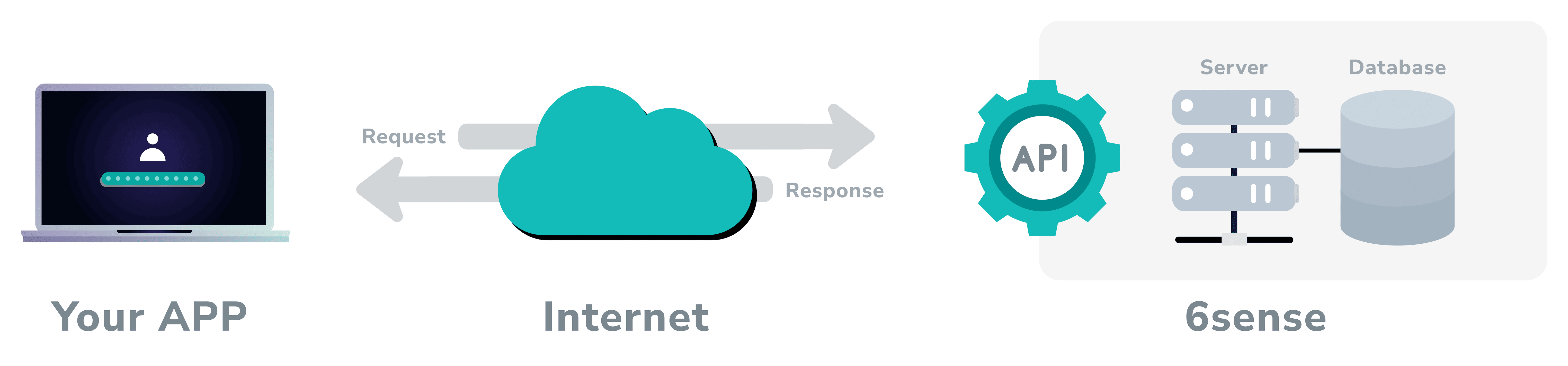
List of 6sense APIs
6senses APIs are used across customer systems like CRM, Marketing Automation Platform, and other technology commonly used to fill in data gaps ensuring revenue teams have the data necessary to make confident data driven GTM decisions. Responses are returned in JSON to support integration with common programming languages and development kits.
| API Name | Description |
|---|---|
| Company Identification API | Company Identification API (previously known as Company Details API) identifies anonymous website visitors by taking an IP address and matching it to an Account. Data returned from this API includes company firmographics, segments, and score data associated with that IP and company. Customers need the 6sense Platform to access this API. Know more about API Credits. |
| Company Firmographics API | Company Firmographics API (previously known as the Lead Enrichment API) delivers company firmographics and segments data attributes using the email id. Customers need 6sense Platform or Sales Intelligence package to access this API. Know more about API Credits. |
| Lead Scoring and Firmographics API | Lead Scoring and Firmographics API (previously known as Lead Enrichment and Scoring API) combines the responses from the Company Firmographics and Lead scoring APIs into a single response. This API is primarily designed for customers using Marketo and to access this API, customers need any 6sense Platform or Sales Intelligence package (for enrichment information) and need the Advanced package (for scoring information). Know more about API Credits. |
| Lead Scoring API | Lead Scoring API scores your net new leads using email id and returns predictive scores at the product level. Customers need 6sense Platform Advanced package to access the API. |
| People Enrichment API | Enrich contact level data using 6sense People Enrichment API directly in your rev-tech platforms (e.g.: CRM, MAP, BI, etc). This API delivers contact information and company firmographics attributes using the email id or LinkedIn URL or people ID. To access this API, customers need to purchase this API as add on and it will work with any 6sense Platform or Sales Intelligence package. Know more about API Credits. |
| People Search API | Easily search for people (or contacts or Leads) in an organisation to find the right one. People Search API delivers the list of profiles matching an account for a given domain. You can narrow down your search using filters like locations, Industries & job titles. This API returns whether or not 6sense has contact information details like Email, Phone, Mobile Number. To get actual contact details of the people using peopleID, use People Enrichment API. |
Types of Credit Models
The APIs listed below use either API Credits or 6sense Credits. Review the table to identify the credit model used by each API. Contact your Customer Success Manager (CSM) to enable access to eligible APIs.
| Credit Model | Description |
|---|---|
| Company Identification API Credits | Use these credits only with the Company Identification API and Server-Side Company Identification API. • 1 matched company = 1 API Credit. • Repeated identification of the same IP address is counted toward API credit deductions according to your contract terms. • This credit model is unchanged. |
| 6sense Credits for Enrichment APIs | The following Enrichment APIs use 6sense Credits: • People Enrichment API • Company Firmographics API • Lead Scoring and Firmographics API To use Enrichment APIs, allocate 6sense Credits from the account credit pool to API (Enrichment). Enrichment APIs consume credits from the allocated API (Enrichment) balance. Credit consumption rules • 1 successfully enriched record = 1 6sense Credit. • Credits are consumed only for successfully enriched records. • Records that do not return a match do not consume credits. Example If you submit 100 records and 80 records are successfully enriched, 80 6sense Credits are consumed. The remaining 20 records do not consume credits. To allocate 6sense Credits to Enrichment APIs:
|
| 6sense Credits for Keyword Intent Data API | To use the Keyword Intent Data API, allocate 6sense Credits from the account credit pool to API (Enrichment). The Keyword Intent Data API consumes credits from the allocated API (Enrichment) balance. Credit consumption rules • 1 successfully discovered account = 3 6sense Credits. • Credits are consumed only for successfully discovered accounts. • Records that do not return a match do not consume credits. Example A Search request returns 20 accounts. If none of those accounts were charged through Search or Enrichment within the previous year, the request consumes 60 credits (20 accounts × 3 credits). If 5 accounts were already charged within the previous year, only the remaining 15 accounts are charged, consuming 45 credits. For paginated results, credits are calculated separately for the accounts returned on each page. |
The following APIs do not consume API Credits or 6sense Credits:
For information about 6sense Credit allocation, distribution, and management, see the Credits Overview article.
Best Practices
At 6sense, we are committed to the security and privacy of your data. Keeping that in mind, we recommend following best practices around API management.
- Give your API Token an appropriate name to help you track where it is being used. This can be the same as the integration for which the token is used.
- Do not assign the same API Token to more than one integration, unless necessary.
- Rotate your API tokens every 90 days.
- Migrate any “default_existing_token” as per guidance in the Migrate Existing Tokens section.
- Deactivate tokens that are not in use and delete tokens that you don’t plan to use anymore. Before deleting a token, if you need the token-related historical match rates and usage graph, follow instructions provided in Option 2 under the Migrate Existing Tokens section to save a copy.
- The API Token settings (Score and Segments Settings) are secure by default (does not return detailed information). Please adjust these settings as required to fetch information that is necessary for your use cases.
- For enrichment APIs as outlined above, please ensure that the API token is never exposed on any public domain. These APIs are designed for server-to-server communication.
Let’s start with the first step!
Authentication
Use the authentication method supported by the API you are accessing.
| Authentication Method | Supported APIs | Setup |
|---|---|---|
| API token | Company Identification API and Enrichment APIs | See Credits & Tokens for APIs. |
| OAuth 2.0 | Keyword Intent Data API, Segments API, and Server-Side Company Identification API | See Enable OAuth Integration in 6sense. |
HTTP Response Codes
6sense uses standard HTTP response codes to indicate the success or failure of an API request. Codes in the 2xx range indicate success; Codes in the 4xx or 5xx range indicate an error.
| Code | Description |
|---|---|
200 |
OK Successfully returned response. The response message varies, depending on the request method/endpoint and the requested data. |
201 |
Created The request has been fulfilled and has resulted in one or more new resources being created. |
204 |
No content The server has successfully fulfilled the request and that there is no additional content to send in the response payload body. |
400 |
Bad request Required fields cannot be blank. Do not repeat the request without first modifying it; check the request for errors, fix them and then retry the request. |
401 |
Unauthorized Your API token is invalid or auth token is invalid or missing authorization header. |
402 |
Quota Exhausted Your allocated Quota is exhausted, please upgrade/top-up your API limit by reaching out to your CSM. |
403 |
Forbidden You do not have the appropriate user rights to access the request. Do not repeat the request. |
404 |
Not found The resource does not exist. |
422 |
Validation error A validation error occurred. |
429 |
Too Many Requests You have sent too many requests in a given amount of time ("rate limit"). Please try again later. |
50X |
Internal Server Error Something went wrong with the 6sense API. These errors are logged on our side. You can contact our team to resolve the issue. |
Error Responses
| Type | Example |
|---|---|
| Required parameters are blank | {"status": "error", "message": "Email ID is mandatory and can’t be blank"} |
| No data found | {"status": "error", "message": "No data found. Please contact 6sense support, if you think this is an unexpected error."} |
Versioning
Each API will show the list of versions supported. You may receive timely notifications to upgrade the APIs to the latest stable version as we will deprecate the older versions which are no longer recommended to use.
API Rate Limit
All API requests are subject to rate limits. A rate limit is the number of API calls an app or user can make within a given time period. If this limit is exceeded or if CPU or total time limits are exceeded, the app or user may be throttled. API requests made by a throttled user or app will fail.
For our APIs we enforce a rate limit of 100 requests per minute interval, which is monitored for adjustment, if required, to ensure valid API requests are fulfilled successfully. In case you want to get this limit increased, please reach out to your CSM.
Company Identification API
Company Identification API identifies anonymous website visitors by taking an IP address and matching it to an Account. Data returned from this API includes company firmographics, segments, and score data associated with that IP and company. Customers need the 6sense RAIM Platform to access this API.
Client-side integration of this API is available within your Webtag configurations. Please use the same to turn ON this API.
For webtag, you do not need to create any API token. If you want to integrate this API outside of the webtag, then you need to create a new API token.
To create a new API token, follow the instructions within our knowledge base.
Company Identification API is designed for client-side implementation to unlock use cases like real time web visitor de-anonymization, website personalization, etc. where latency is a important. We do not recommend server side implementation of this API. If you have a complex use case, please talk to your CSM.
HTTP Request
Headers
Sample Request
curl --location --request GET 'https://epsilon.6sense.com/v3/company/details' \
--header 'Authorization: Token {your_api_token}' \
--header 'X-6s-CustomID: {partner_name-partner_api_token}'
var xhr = new XMLHttpRequest();
xhr.withCredentials = true;

xhr.addEventListener("readystatechange", function() {
    if (this.readyState === 4) {
        console.log(this.responseText);
    }
});


xhr.open("GET", "https://epsilon.6sense.com/v3/company/details");
xhr.setRequestHeader("Authorization", "Token {your_api_token}");
xhr.setRequestHeader("X-6s-CustomID", "{partner_name-partner_api_token}");
var request = require('request');
var options = {
    'method': 'GET',
    'url': 'https://epsilon.6sense.com/v3/company/details',
    'headers': {
        'Authorization': 'Token {your_api_token}',
        'X-6s-CustomID': '{partner_name-partner_api_token}'
    }
};
request(options, function(error, response) {
    if (error) throw new Error(error);
    console.log(response.body);
});
import requests

url = "https://epsilon.6sense.com/v3/company/details"

payload = {}
headers = {
  "Authorization": "Token {your_api_token}",
  "X-6s-CustomID": "{partner_name-partner_api_token}"
}

response = requests.request("GET", url, headers=headers, data=payload)

print(response.text)
{
  "info": {
    "name": "6signal",
    "schema": "https://schema.getpostman.com/json/collection/v2.1.0/collection.json"
  },
  "item": [
    {
      "name": "https://epsilon.6sense.com/v3/company/details",
      "request": {
        "method": "GET",
        "header": [
          {
            "key": "Authorization",
            "type": "text",
            "value": "Token {your_api_token}"
          },
          {
            "key": "Content-Type",
            "name": "Content-Type",
            "type": "text",
            "value": "application/x-www-form-urlencoded",
            "disabled": true
          },
          {
            "key": "EpsilonCookie",
            "type": "text",
            "value": "{optional cookie value}",
            "disabled": true
          },
          {
            "key": "X-6s-CustomID",
            "type": "text",
            "value": "{partner_name-partner_api_token}"
          }
        ],
        "url": {
          "raw": "https://epsilon.6sense.com/v3/company/details",
          "protocol": "https",
          "host": [
            "epsilon",
            "6sense",
            "com"
          ],
          "path": [
            "v3",
            "company",
            "details"
          ]
        }
      },
      "response": []
    }
  ]
}
| Header | Value |
|---|---|
| Authorization | Token <api_token> |
| EpsilonCookie(optional) |
If you are a Partner then, you must send this additional header for customer data identification.
| Header | Value |
|---|---|
| X-6s-CustomID |
|
Response Data
Sample Response
{
    "company": {
        "company_match": "Match",
        "additional_comment": "Company name or domain match was found",
        "companyId": "j776sdf7sdfh766777dsf",
        "domain": "g.ucla.edu",
        "name": "UCLA",
        "region": "Northern America",
        "country": "United States",
        "state": "California",
        "city": "Los Angeles",
        "industry": "Education",
        "country_iso_code": "US",
        "address": "308 Charles E. Young Drive North A210 Fowler Building/Box 951510",
        "zip": "90095",
        "phone": "(310) 825-4321",
        "employee_range": "10,000+",
        "revenue_range": "$5B+",
        "employee_count": "22000",
        "annual_revenue": "7449000000",
        "is_blacklisted": false,
        "is_6qa": true,
        "geoIP_country": "United States",
        "geoIP_state": "California",
        "geoIP_city":   "San Jose",
        "state_code": "CA",
        "industry_v2": [
            {
                "industry": "Education",
                "subindustry": "Colleges & Universities"
            }
        ],
        "sic_description": "",
        "sic": "",
        "naics": "6113",
        "naics_description": "Colleges, Universities, and Professional Schools"
    },
    "scores": [
        {
            "is_6qa": true,
            "product": "6sense",
            "product_display_name": "6sense",
            "intent_score": 63,
            "buying_stage": "Consideration",
            "profile_score": 9,
            "profile_fit": "Weak"
        }
    ],
    "segments": {
        "ids": [
            4713,
            28237,
            218915,
            53685
        ],
        "names": [
            "Net New Logo Website Engagement Last 30 Days",
            "6s for 6s: Keyword_Sales Intelligence",
            "Cvent: Researching Virtual Events",
            "EY - Enterprise Accounts (DemandGen)"
        ],
        "list": [
            {
                "name": "Net New Logo Website Engagement Last 30 Days",
                "id": 4713
            },
            {
                "name": "6s for 6s: Keyword_Sales Intelligence",
                "id": 28237
            },
            {
                "name": "Cvent: Researching Virtual Events",
                "id": 218915
            },
            {
                "name": "EY - Enterprise Accounts (DemandGen)",
                "id": 53685
            }
        ]
    },
    "confidence": "Very High"
}
| Parameters | |
|---|---|
| Account/company Level Variables |
Below are the list of company variables that will be available in the API response.
Below are sample values for these parameters.
|
| company_match |
String
Identifies if 6sense has matched an IP to an Account. Response could be "Match" or "Non-actionable Match" or "No Match"
"Match" or "Non-actionable Match" or "No Match"
|
| additional_comment |
String
Provides details into the company_match status and match reasons.
In case of "Match" it will return "Company name or domain match was found".
In case of "Non-actionable Match" it will return "There is no valid B2B use case as this was matched to something other than a company name/domain (i.e.: bot, host, noisy signal, etc.)". And In case of "No match" it will return "No company name or domain was found". |
| companyId |
String
6sense Unique ID of the Company or Account
78678as6d6as87d6as
|
| name |
String
Name of the company
6sense
|
| domain |
String
Website of the company
6sense .com
|
| industry |
String
Industry of the company
Software and Technology
|
| industry_v2 |
Array
Industry and Sub-Industry of the company
"industry": "Education","subindustry": "Colleges & Universities"
|
| country |
String
Country of the company’s Headquarter
United States
|
| address |
String
Address
450 Mission
|
| state |
String
State
California
|
| city |
String
City or Location
San Francisco
|
| zip |
String
Zip code
94107
|
| employee_count |
String
Approximate Employee count
201
|
| employee_range |
String
Employee Range
100 - 249
|
| annual_revenue |
String
Approximate Annual Revenue
$12,603,100
|
| revenue_range |
String
Annual Revenue Range
$10M - $25M
|
| sic |
String
Standard Industrial Classification Codes (SIC Codes) of the company
7372
|
| sic_description |
String
Additional details provided by SIC
Prepackaged Software
|
| naics |
String
North American Industry Classification System (NAICS)
5112
|
| naics_description |
String
Additional details provided by NAICS
Software Publishers
|
| region |
String
Geographic Region of the Headquarter
North America
|
| country_iso_code |
String
Country ISO code
US
|
| phone |
String
Company Phone Number
(415) 212-9225
|
| is_blacklisted |
True
|
| is_6qa |
Boolean
Account level 6QA (true when this account is considered as hot account by 6sense)
True
|
| geoIP_country |
String
geographical country of the visitor IP address
United States
|
| geoIP_state |
String
geographical state of the visitor IP address
California
|
| geoIP_city |
String
geographical city of the visitor IP address
San Jose
|
| Scores |
Predictive scores will be returned at the product level. If you have multiple product model, they API will return scores for each product category. To receive score information in the API you will need to enable this feature in the API Settings & Configurations. For more details on scoring and how scores are determined please visit the 6sense Knowledge Base in Rev City.
Below are sample values for these parameters.
|
| is_6qa |
Boolean
Account level 6QA (true when account is considered as hot account by 6sense for this product)
True
|
| product |
String
The name of the specific predictive model when a customer has more than one model. The product category values are the model names.
ace
|
| intent_score |
Integer
The numerical intent score that is tied to a specific buying stage. The numerical range is 0-100.
81
|
| buying_stage |
String
A 6sense AI-derived in-market prediction of the likelihood to open an opportunity in the next 90 days for a particular product category. Response could be Purchase, Decision, Consideration, Awareness, Target.
Purchase
|
| profile_score |
Integer
The numerical profile fit score that is tied to a specific profile fit. The numerical range is 0-100.
73
|
| profile_fit |
String
Profile fit identifies accounts based on ideal customer profile (ICP) by looking at historical firmographic data within the CRM. Response could be Strong, Moderate, Weak.
Strong
|
| product_display_name |
String
Name of your product displayed externally.
ace
|
| Segments | |
| ids |
Array
Id for single or multiple segments
12121 or 456456, 119900, 226688,
|
| names |
Array
This gives out the Segment Name. Visibility of Segment Name can be controlled in API Settings. To control these settings within the 6sense platform review the instructions here.
“Web Visitors Last 30 days”, “second”, “third”
|
| list |
Array
Combined response for Segment ID and Name. Visibility of Segment Name can be controlled in API Settings. To control these settings within the 6sense platform review the instructions here.
"name": "Web Visitors Last 30 days", "id": 123123
|
| confidence |
String
The 6sense's confidence in the accuracy of the identity of the account. Response could be Very High, High, Moderate, Low.
Very High
|
Response Codes
| Code | Definition |
|---|---|
200 |
OK Successfully returned response. The response message varies, depending on the request method/endpoint and the requested data. |
OTHERS |
Other common HTTP response codes Please see HTTP Response Codes to know more codes. |
 Currently, we support only IPV4 IP addresses.
In case of invalid IP Address, you will get blank data for each of these above mentioned variables.
If a field is not present, then we’ll return an empty list or null value for that field.
Server-Side Company Identification API
Use the Server-Side Company Identification API when you have an IP address and want to identify the associated company. The API is designed for server-side applications, including backend systems, data pipelines, integrations, and AI agents. When a company is identified, the API returns company and firmographic information, with optional product scores and segment membership.
The API requires OAuth 2.0 client credentials and isn’t supported for client-side use in browsers, mobile SDKs, or client-side tags. For client-side implementation, see the Company Identification API.
Use Cases
- Backend and data pipelines: Enrich visitor IP addresses captured from CDNs, load balancers, or access logs with company and firmographic data for downstream CRM or data warehouse ingestion.
- AI agents: Identify a company from a visitor IP address associated with a web event before an agent determines the next action.
- Partner integrations: Resolve IP addresses received from third-party systems to 6sense company records as part of a server-side integration.
- Server-side web personalization: Identify visitors from server-side applications that have access to signals such as IP addresses or first-party cookies.
- Analytics and attribution: Add company context to event data from servers, data warehouses, or CDPs for downstream reporting and attribution.
HTTP Request
The API returns HTTP 200 when resolution completes, including when no company is identified. Check company.companyMatch to determine the resolution outcome.
Credit Consumption
Only a match consumes a credit.
IP Address Requirements
- For
ip, provide a valid, routable IPv4 address. Private and reserved addresses, including RFC 1918, loopback, and link-local addresses, return HTTP 400. - If your application is behind a reverse proxy, set the
iprequest parameter to the value fromX-Real-IPor the left-most public IP address fromX-Forwarded-For. Don’t use the server’s egress IP address or the IP address of the CDN or load balancer. - For
ipv6, the API performs resolution on the /64 network prefix. All hosts within a /64 therefore resolve to the same account.
Authentication
The Server-Side Company Identification API uses OAuth 2.0 for authentication. Before calling the API, configure OAuth access and obtain an access token. For instructions, see Enable OAuth Integration in 6sense.
The following OAuth scopes apply:
| OAuth Scope | Requirement | Description |
|---|---|---|
| View Company Data | Required | Required to identify a company and return the company profile. |
| View Company Location Data | Optional | Required for location, phone, and IP-geolocation fields. |
| View Company Scores | Optional | Required to return product scores when includeScores is set to true. |
| View Segments | Optional | Required to return segment membership when includeSegments is set to true. |
Headers
| Header | Value |
|---|---|
| Authorization | Bearer <oauth_access_token> |
| Content-Type | application/json |
| Accept | application/json |
Request Body
Sample Request
curl --location --request POST 'https://api.6sense.com/api/account/v1/identify' \
--header 'Authorization: Bearer {your_oauth_access_token}' \
--header 'Content-Type: application/json' \
--header 'Accept: application/json' \
--data-raw '{
  "ip": "192.0.2.0",
  "includeScores": true,
  "includeSegments": true,
  "recordTrackingId": "RT-123456789"
}'
var data = JSON.stringify({
  "ip": "192.0.2.0",
  "includeScores": true,
  "includeSegments": true,
  "recordTrackingId": "RT-123456789"
});

var xhr = new XMLHttpRequest();

xhr.addEventListener("readystatechange", function() {
    if (this.readyState === 4) {
        console.log(this.responseText);
    }
});

xhr.open("POST", "https://api.6sense.com/api/account/v1/identify");
xhr.setRequestHeader("Authorization", "Bearer {your_oauth_access_token}");
xhr.setRequestHeader("Content-Type", "application/json");
xhr.setRequestHeader("Accept", "application/json");

xhr.send(data);
var request = require('request');
var options = {
    'method': 'POST',
    'url': 'https://api.6sense.com/api/account/v1/identify',
    'headers': {
        'Authorization': 'Bearer {your_oauth_access_token}',
        'Content-Type': 'application/json',
        'Accept': 'application/json'
    },
    body: JSON.stringify({
        "ip": "192.0.2.0",
        "includeScores": true,
        "includeSegments": true,
        "recordTrackingId": "RT-123456789"
    })
};
request(options, function(error, response) {
    if (error) throw new Error(error);
    console.log(response.body);
});
import requests

url = "https://api.6sense.com/api/account/v1/identify"

payload = {
  "ip": "192.0.2.0",
  "includeScores": True,
  "includeSegments": True,
  "recordTrackingId": "RT-123456789"
}

headers = {
  "Authorization": "Bearer {your_oauth_access_token}",
  "Content-Type": "application/json",
  "Accept": "application/json"
}

response = requests.request("POST", url, headers=headers, json=payload)

print(response.text)
{
  "info": {
    "name": "Server-Side Company Identification",
    "schema": "https://schema.getpostman.com/json/collection/v2.1.0/collection.json"
  },
  "item": [
    {
      "name": "https://api.6sense.com/api/account/v1/identify",
      "request": {
        "method": "POST",
        "header": [
          {
            "key": "Authorization",
            "type": "text",
            "value": "Bearer {your_oauth_access_token}"
          },
          {
            "key": "Content-Type",
            "type": "text",
            "value": "application/json"
          },
          {
            "key": "Accept",
            "type": "text",
            "value": "application/json"
          }
        ],
        "body": {
          "mode": "raw",
          "raw": "{\n  \"ip\": \"192.0.2.0\",\n  \"includeScores\": true,\n  \"includeSegments\": true,\n  \"recordTrackingId\": \"RT-123456789\"\n}",
          "options": {
            "raw": {
              "language": "json"
            }
          }
        },
        "url": {
          "raw": "https://api.6sense.com/api/account/v1/identify",
          "protocol": "https",
          "host": [
            "api",
            "6sense",
            "com"
          ],
          "path": [
            "api",
            "account",
            "v1",
            "identify"
          ]
        }
      },
      "response": []
    }
  ]
}
| Parameters | |
|---|---|
| ip |
StringConditional
IPv4 address of the visitor to identify. Must be a valid, routable address.
192.0.2.0
|
| ipv6 |
StringConditional
IPv6 address of the visitor to identify. Resolution is performed on the /64 network prefix.
2001:db8::1
|
| cookie |
StringOptional
A 6sense first-party cookie identifier. For more details, see 6sense Cookies and Browser Storage. |
| recordTrackingId |
StringOptional
An identifier that you provide to associate the API response with the corresponding record in your system. The API returns the same identifier in the response.
RT-123456789
|
| includeSegments |
BooleanOptional
Specifies whether to include segment membership in the response. Default: false. The access token must include the View Segments scope when this parameter is set to true. If the organization isn’t entitled to segment data, segments are omitted regardless of the setting.
false
|
| includeScores |
BooleanOptional
Specifies whether to include per-product scores in the response. Default: false. The access token must include the View Company Scores scope when this parameter is set to true. Score data is also subject to the organization’s scoring entitlement.
false
|
Response Data
Sample Response
{
  "company": {
    "companyMatch": "match",
    "additionalComment": "Company name or domain match was found",
    "companyId": "j776sdf7sdfh766777dsf",
    "name": "UCLA",
    "domain": "g.ucla.edu",
    "industry": "Education",
    "industryV2": [
      {
        "industry": "Education",
        "subIndustry": "Colleges & Universities"
      }
    ],
    "country": "United States",
    "state": "California",
    "city": "Los Angeles",
    "address": "308 Charles E. Young Drive North A210 Fowler Building/Box 951510",
    "zip": "90095",
    "region": "Northern America",
    "countryIsoCode": "US",
    "stateCode": "CA",
    "phone": "(310) 825-4321",
    "employeeRange": "10,000+",
    "employeeCount": 22000,
    "revenueRange": "$5B+",
    "annualRevenue": 7449000000,
    "sic": "",
    "sicDescription": "",
    "naics": "6113",
    "naicsDescription": "Colleges, Universities, and Professional Schools",
    "isBlacklisted": false,
    "is6qa": true,
    "geoIpCountry": "United States",
    "geoIpState": "California",
    "geoIpCity": "San Jose"
  },
  "scores": [
    {
      "product": "6sense",
      "productDisplayName": "6sense",
      "is6qa": true,
      "intentScore": 63,
      "buyingStage": "Consideration",
      "profileScore": 9,
      "profileFit": "Weak"
    }
  ],
  "segments": {
    "ids": [4713, 28237, 218915, 53685],
    "names": [
      "Net New Logo Website Engagement Last 30 Days",
      "6s for 6s: Keyword_Sales Intelligence",
      "Cvent: Researching Virtual Events",
      "EY - Enterprise Accounts (DemandGen)"
    ],
    "list": [
      { "id": 4713, "name": "Net New Logo Website Engagement Last 30 Days" },
      { "id": 28237, "name": "6s for 6s: Keyword_Sales Intelligence" },
      { "id": 218915, "name": "Cvent: Researching Virtual Events" },
      { "id": 53685, "name": "EY - Enterprise Accounts (DemandGen)" }
    ]
  },
  "confidence": "veryHigh",
  "resolvedBy": "cookie",
  "recordTrackingId": "RT-123456789"
}
| Parameters | |
|---|---|
| Company |
Company identity and firmographic data. company is null when no company is identified.
Below are sample values for these parameters.
|
| company |
Object or null
Company identity and firmographic data. Returns null when no company is identified. |
| company.companyMatch |
String
Outcome of the identification attempt. Possible values:
match
|
| company.additionalComment |
String
Human-readable description of the match status.
Company name or domain match was found
|
| company.companyId |
String
6sense unique account identifier (MID).
j776sdf7sdfh766777dsf
|
| company.name |
String
Company name.
UCLA
|
| company.domain |
String
Primary website domain.
g.ucla.edu
|
| company.industry |
String
Primary industry.
Education
|
| company.industryV2 |
Array of objects
Industry and subindustry pairs.
"industry": "Education", "subIndustry": "Colleges & Universities"
|
| company.industryV2[].industry |
String
Industry.
Education
|
| company.industryV2[].subIndustry |
String
Subindustry.
Colleges & Universities
|
| company.country |
String
Country of the matched country-level entity.
United States
|
| company.state |
String
State.
California
|
| company.city |
String
City.
Los Angeles
|
| company.address |
String
Street address.
308 Charles E. Young Drive North
|
| company.zip |
String
Postal code.
90095
|
| company.region |
String
Geographic region.
Northern America
|
| company.countryIsoCode |
String
ISO 3166-1 alpha-2 country code.
US
|
| company.stateCode |
String
State or province code.
CA
|
| company.phone |
String
Company phone number.
(310) 825-4321
|
| company.employeeRange |
String
Employee count range.
10,000+
|
| company.employeeCount |
Integer
Approximate employee count.
22000
|
| company.revenueRange |
String
Annual revenue range.
$5B+
|
| company.annualRevenue |
Integer
Approximate annual revenue.
7449000000
|
| company.sic |
String
SIC code.
7372
|
| company.sicDescription |
String
SIC description.
Prepackaged Software
|
| company.naics |
String
NAICS code.
6113
|
| company.naicsDescription |
String
NAICS description.
Colleges, Universities, and Professional Schools
|
| company.isBlacklisted |
Boolean
Indicates whether the account is on the organization’s exclusion list.
false
|
| company.is6qa |
Boolean
Indicates whether the account is currently in 6QA.
true
|
| company.geoIpCountry |
String
Country resolved from the supplied IP address. This value can differ from the headquarters country.
United States
|
| company.geoIpState |
String
State resolved from the supplied IP address.
California
|
| company.geoIpCity |
String
City resolved from the supplied IP address.
San Jose
|
| Scores |
Product scores are returned when includeScores is true and the token includes the View Company Scores scope.
Below are sample values for these parameters.
|
| scores |
Array of objects or null
Product scores. Returns null when scores aren’t requested or the organization isn’t entitled to scores. |
| scores[].product |
String
Internal product identifier.
6sense
|
| scores[].productDisplayName |
String
Human-readable product name.
6sense
|
| scores[].is6qa |
Boolean
6QA status for the product.
true
|
| scores[].intentScore |
Integer
Intent score from 0 through 100.
63
|
| scores[].buyingStage |
String
Current buying stage. Possible values: Awareness, Target, Consideration, Decision, Purchase, and NA.
Consideration
|
| scores[].profileScore |
Integer
Profile fit score.
9
|
| scores[].profileFit |
String
Profile fit label. For example, Strong or Weak.
Weak
|
| Segments |
Segment membership is returned when includeSegments is true and the token includes the View Segments scope.
Below are sample values for these parameters.
|
| segments.ids |
Array of integers
Segment identifiers that the identified account belongs to.
4713, 28237
|
| segments.names |
Array of strings
Segment names, positionally aligned with segments.ids.
"Net New Logo Website Engagement Last 30 Days"
|
| segments.list |
Array of objects
Segment identifier and name pairs.
"id": 4713, "name": "Net New Logo Website Engagement Last 30 Days"
|
| segments.list[].id |
Integer
Segment identifier.
4713
|
| segments.list[].name |
String
Segment name.
Net New Logo Website Engagement Last 30 Days
|
| confidence |
String or null
Confidence in the resolution. Possible values: veryHigh, high, moderate, low, and NA.
veryHigh
|
| resolvedBy |
String or null
Identifier used to resolve the account. Possible values: cookie, ipv4, ipv6Exact, ipv6Range, and none.
cookie
|
| recordTrackingId |
String or null
Correlation identifier supplied in the request and returned unchanged in the response.
RT-123456789
|
Response Codes
| Code | Definition |
|---|---|
200 |
OK The identification request was processed successfully, even if no company is identified. The companyMatch field indicates whether the request resulted in a match, nonActionableMatch, or noMatch. |
400 |
Bad Request The request contains a missing, malformed, or non-routable identifier. For example, an incomplete or private IP address. |
401 |
Unauthorized The access token is missing or invalid. |
402 |
Payment Required The organization’s API credit quota is exhausted. |
403 |
Forbidden The token isn’t permitted to call the endpoint. This response can occur when the token is client-scoped, Company Identification API access is disabled, the token doesn’t include the View Company Data scope, or the View Company Scores or View Segments scope is missing when scores or segments are requested. A token without the View Company Location Data scope doesn’t cause a 403 response; the API returns the profile without the restricted fields. |
429 |
Too Many Requests The rate limit is exceeded. The API supports up to 100 transactions per second (TPS). When you receive a 429 response, retry the request after 1 second. |
500 |
Internal Server Error An internal server error occurred. |
Company Firmographics API
The Company Firmographics API (previously known as Lead Enrichment API) delivers company firmographics data for the provided people (or lead or contact) email address. The response also includes segment information. Customers need 6sense Platform or Sales Intelligence package to access this API.
You would need Enrichment APIs Credit to access this API. If you want to create or delete these API tokens, please reach out to support. Read more
Version 3 (Latest)
HTTP Request
Headers
| Header | Value |
|---|---|
| Authorization | Token <api_token> |
| Content-Type | application/x-www-form-urlencoded |
Input Params
Sample Request
curl --location --request POST 'https://api.6sense.com/v1/enrichment/company' \
--header 'Content-Type: application/x-www-form-urlencoded' \
--header 'Cache-Control: no-cache' \
--header 'Authorization: Token {your_api_token}' \
--data-urlencode 'email=<user_name>@<domain>.com' \
--data-urlencode 'domain=<domain_value>' \
--data-urlencode 'country=<country_value>' \
--data-urlencode 'company=<company_value>' \
--data-urlencode 'industry=<industry_value>' \
--data-urlencode 'title=<title_value>' \
--data-urlencode 'role=<role_value>' \
--data-urlencode 'firstname=<firstname_value>' \
--data-urlencode 'lastname=<lastname_value>' \
--data-urlencode 'leadsource=<leadsource_value>'
var data = "email=<user_name>@<domain>.com &
    domain = < domain_value >
    &
    country = < country_value >
    &
    company = < company_value >
    &
    industry = < industry_value >
    &
    title = < title_value >
    &
    role = < role_value >
    &
    firstname = < firstname_value >
    &
    lastname = < lastname_value >
    &
    leadsource = < leadsource_value >
    ";

var xhr = new XMLHttpRequest();
xhr.withCredentials = true;


xhr.addEventListener("readystatechange", function() {
    if (this.readyState === 4) {
        console.log(this.responseText);
    }
});

xhr.open("POST", "https://api.6sense.com/v1/enrichment/company");
xhr.setRequestHeader("Content-Type", "application/x-www-form-urlencoded");
xhr.setRequestHeader("Cache-Control", "no-cache");
xhr.setRequestHeader("Authorization", "Token {your_api_token}");

xhr.send(data);
var request = require('request');
var options = {
    'method': 'POST',
    'url': 'https://api.6sense.com/v1/enrichment/company',
    'headers': {
        'Content-Type': 'application/x-www-form-urlencoded',
        'Cache-Control': 'no-cache',
        'Authorization': 'Token {your_api_token}'
    },
    form: {
        'email': '<user_name>@<domain>.com',
        'domain': '<domain_value>',
        'country': '<country_value>',
        'company': '<company_value>',
        'industry': '<industry_value>',
        'title': '<title_value>',
        'role': '<role_value>',
        'firstname': '<firstname_value>',
        'lastname': '<lastname_value>',
        'leadsource': '<leadsource_value>'
    }
};
request(options, function(error, response) {
    if (error) throw new Error(error);
    console.log(response.body);
});
import requests

url = "https://api.6sense.com/v1/enrichment/company"

payload=’email=<user_name>@<domain>.com
  &domain=<domain_value>
  &country=<country_value>
  &company=<company_value>
  &industry=<industry_value>
  &title=<title_value>
  &role=<role_value>
  &firstname=<firstname_value>
  &lastname=<lastname_value>
  &leadsource=<leadsource_value>’

headers = {
  'Content-Type': 'application/x-www-form-urlencoded',
  'Cache-Control': 'no-cache',
  'Authorization': 'Token {your_api_token}'
}

response = requests.request("POST", url, headers=headers, data=payload)

print(response.text)
  {
  "info": {
    "name": "sample_scribe",
    "schema": "https://schema.getpostman.com/json/collection/v2.1.0/collection.json"
  },
  "item": [
    {
      "name": "https://api.6sense.com/v1/enrichment/company",
      "request": {
        "method": "POST",
        "header": [
          {
            "key": "Content-Type",
            "name": "Content-Type",
            "value": "application/x-www-form-urlencoded",
            "type": "text"
          },
          {
            "key": "Cache-Control",
            "value": "no-cache",
            "type": "text"
          },
          {
            "key": "Authorization",
            "value": "Token {your_api_token}",
            "type": "text"
          }
        ],
        "body": {
          "mode": "urlencoded",
          "urlencoded": [
            {
              "key": "email",
              "value": "<user_name>@<domain>.com\n",
              "type": "text"
            },
            {
              "key": "domain",
              "value": "<domain_value>",
              "type": "text"
            },
            {
              "key": "country",
              "value": "<country_value>",
              "type": "text"
            },
            {
              "key": "company",
              "value": "<company_value>",
              "type": "text"
            },
            {
              "key": "industry",
              "value": "<industry_value>",
              "type": "text"
            },
            {
              "key": "title",
              "value": "<title_value>",
              "type": "text"
            },
            {
              "key": "role",
              "value": "<role_value>",
              "type": "text"
            },
            {
              "key": "firstname",
              "value": "<firstname_value>",
              "type": "text"
            },
            {
              "key": "lastname",
              "value": "<lastname_value>",
              "type": "text"
            },
            {
              "key": "leadsource",
              "value": "<leadsource_value>",
              "type": "text"
            }
          ]
        },
        "url": {
          "raw": "https://api.6sense.com/v1/enrichment/company",
          "protocol": "https",
          "host": [
            "api",
            "6sense",
            "com"
          ],
          "path": [
            "v1",
            "enrichment",
            "company"
          ],
          "query": [
            {
              "key": "country",
              "value": "",
              "disabled": true
            }
          ]
        }
      },
      "response": []
    }
  ]
}
| Parameters | |
|---|---|
|
StringMandatory only if domain is blank
If both email and domain are provided as input then, we should prioritize email for match and then fall back to domain
abc.xyz@6sense.com
|
|
| domain |
StringMandatory only if email is blank
If both email and domain are provided as input then, we should prioritize email for match and then fall back to domain.
6sense.com
|
| country |
StringRequired for Company ID resolution
Used as a filter along with the mandatory parameter. Required to resolve and return a `companyId` in the response. If `country` is omitted, the API can return firmographic data, but `companyId` won't be populated.
US
|
| company |
Stringoptional
Used as filter along with the mandatory parameter
Dell
|
| industry |
Stringoptional
Used as filter along with the mandatory parameter
Software and Technology
|
| title |
Stringoptional
Used as filter along with the mandatory parameter
Procurement Manager
|
| role |
Stringoptional
Used as filter along with the mandatory parameter
Procurement Manager
|
| firstname |
Stringoptional
Used as filter along with the mandatory parameter
ABC
|
| lastname |
Stringoptional
Used as filter along with the mandatory parameter
XYZ
|
| leadsource |
Stringoptional
Used as filter along with the mandatory parameter
Website form
|
Response Data
Sample Response
{
  "company": {
    "companyId": "j776sdf7sdfh766777dsf",
    "domain": "6sense.com",
    "name": "6sense",
    "region": "Northern America",
    "country": "United States",
    "countryISOCode": "US",
    "state": "California",
    "city": "San Francisco",
    "streetAddress": "450 Mission St,",
    "postalCode": "94105",
    "companyPhone": "415-212-9225",
    "industry": "Software and Technology",
    "employeeRange": "1,000 - 4,999",
    "revenueRange": "$100M - $250M",
    "employeeCount": "1192",
    "annualRevenue": "104000000",
    "titleLevel": "staff",
    "titleFunction": "engineering",
    "sicdescription": "Prepackaged Software",
    "siccode": "7372",
    "naicscode": "511210",
    "naicsdescription": "Software Publishers"
  },
  "segments": {
    "ids": [],
    "names": [],
    "list": []
  }
}
Account/company Level Variables: Below are the data points that are available in the API response.
| Parameters | |
|---|---|
| companyId |
String
6sense Unique Id of the Company or Account
78678as6d6as87d6as
|
| domain |
String
Website of the company
6sense.com
|
| name |
String
Name of the company
6sense
|
| industry |
String
Industry of the company
Software and Technology
|
| country |
String
Country of the company’s Headquarter
United States
|
| streetAddress |
String
Address
450 Mission
|
| state |
String
State
California
|
| city |
String
City or Location
San Francisco
|
| postalCode |
String
Zip code
94107
|
| employeeCount |
String
Approximate Employee count
201
|
| employeeRange |
String
Employee Range
100 - 249
|
| annualRevenue |
String
Approximate Annual Revenue
$12,603,100
|
| titleLevel |
String
Title of the Org-structure level
staff
|
| titleFunction |
String
Function title
engineering
|
| revenueRange |
String
Annual Revenue Range
$10M - $25M
|
| siccode |
String
Standard Industrial Classification Codes (SIC Codes) of the company
7372
|
| sicdescription |
String
Additional details provided by SIC
Prepackaged Software
|
| naicscode |
String
North American Industry Classification System (NAICS)
5112
|
| naicsdescription |
String
Additional details provided by NAICS
Software Publishers
|
| region |
String
Geographic Region of the Headquarter
North America
|
| countryISOCode |
String
Country ISO code
US
|
| companyPhone |
String
Company Phone Number
(415) 212-9225
|
| segments |
Object
6sense segments the company belongs to |
| Segments |
Segments published within the 6sense ABM platform will be available in the API response. Segments Name will be available only if enabled in API Settings. To control these settings within the 6sense platform review the instructions here.
Below are sample values for these parameters.
|
| ids |
Array
Id for single or multiple segments
12121 or 456456, 119900, 226688,
|
| names |
Array
This gives out the Segment Name. Visibility of Segment Name can be controlled in API Settings. To control these settings within the 6sense platform review the instructions here.
“Web Visitors Last 30 days”, “second”, “third”
|
| list |
Array
Combined response for Segment ID and Name. Visibility of Segment Name can be controlled in API Settings. To control these settings within the 6sense platform review the instructions here.
"name": "Web Visitors Last 30 days",
|
Response Codes
| Code | Definition |
|---|---|
200 |
OK Successfully returned response against an email address |
404 |
Not found Invalid email ID. Please make sure you have sent a valid email address in email field. |
OTHERS |
Other common HTTP response codes Please see HTTP Response Codes to know more codes. |
In case of invalid email Address, you will get blank data for each of these above mentioned variables.If a field is not present, then we’ll return an empty list or null value for that field.
Version 2
HTTP Request
Headers
| Header | Value |
|---|---|
| Authorization | Token <api_token> |
| Content-Type | application/x-www-form-urlencoded |
Input Params
Sample Request
curl --location --request POST 'https://scribe.6sense.com/v2/people/enrichment' \
--header 'Content-Type: application/x-www-form-urlencoded' \
--header 'Cache-Control: no-cache' \
--header 'Authorization: Token {your_api_token}' \
--data-urlencode 'email=<user_name>@<domain>.com' \
--data-urlencode 'country=<country_value>' \
--data-urlencode 'company=<company_value>' \
--data-urlencode 'website=<website_value>' \
--data-urlencode 'title=<title_value>' \
--data-urlencode 'leadsource=<leadsource_value>' \
--data-urlencode 'firstname=<firstname_value>' \
--data-urlencode 'lastname=<lastname_value>' \
--data-urlencode 'role=<role_value>' \
--data-urlencode 'industry=<industry_value>'
var data = "email=<user_name>@<domain>.com &
    country = < country_value >
    &
    company = < company_value >
    &
    website = < website_value >
    &
    title = < title_value >
    &
    leadsource = < leadsource_value >
    &
    firstname = < firstname_value >
    &
    lastname = < lastname_value >
    &
    role = < role_value >
    &
    industry = < industry_value > ";

var xhr = new XMLHttpRequest();
xhr.withCredentials = true;


xhr.addEventListener("readystatechange", function() {
    if (this.readyState === 4) {
        console.log(this.responseText);
    }
});

xhr.open("POST", "https://scribe.6sense.com/v2/people/enrichment");
xhr.setRequestHeader("Content-Type", "application/x-www-form-urlencoded");
xhr.setRequestHeader("Cache-Control", "no-cache");
xhr.setRequestHeader("Authorization", "Token {your_api_token}");

xhr.send(data);
var request = require('request');
var options = {
    'method': 'POST',
    'url': 'https://scribe.6sense.com/v2/people/enrichment',
    'headers': {
        'Content-Type': 'application/x-www-form-urlencoded',
        'Cache-Control': 'no-cache',
        'Authorization': 'Token {your_api_token}'
    },
    form: {
        'email': '<user_name>@<domain>.com',
        'country': '<country_value>',
        'company': '<company_value>',
        'website': '<website_value>',
        'title': '<title_value>',
        'leadsource': '<leadsource_value>',
        'firstname': '<firstname_value>',
        'lastname': '<lastname_value>',
        'role': '<role_value>',
        'industry': '<industry_value>'
    }
};
request(options, function(error, response) {
    if (error) throw new Error(error);
    console.log(response.body);
});
import requests

url = "https://scribe.6sense.com/v2/people/enrichment"

payload=’email=<user_name>@<domain>.com
  &country=<country_value>
  &company=<company_value>
  &website=<website_value>
  &title=<title_value>
  &leadsource=<leadsource_value>
  &firstname=<firstname_value>
  &lastname=<lastname_value>
  &role=<role_value>
  &industry=<industry_value>’

headers = {
  'Content-Type': 'application/x-www-form-urlencoded',
  'Cache-Control': 'no-cache',
  'Authorization': 'Token {your_api_token}'
}

response = requests.request("POST", url, headers=headers, data=payload)

print(response.text)
  {
  "info": {
    "name": "sample_scribe",
    "schema": "https://schema.getpostman.com/json/collection/v2.1.0/collection.json"
  },
  "item": [
    {
      "name": "https://scribe.6sense.com/v2/people/enrichment",
      "request": {
        "method": "POST",
        "header": [
          {
            "key": "Content-Type",
            "name": "Content-Type",
            "value": "application/x-www-form-urlencoded",
            "type": "text"
          },
          {
            "key": "Cache-Control",
            "value": "no-cache",
            "type": "text"
          },
          {
            "key": "Authorization",
            "value": "Token {your_api_token}",
            "type": "text"
          }
        ],
        "body": {
          "mode": "urlencoded",
          "urlencoded": [
            {
              "key": "email",
              "value": "<user_name>@<domain>.com\n",
              "type": "text"
            },
            {
              "key": "country",
              "value": "<country_value>",
              "type": "text"
            },
            {
              "key": "company",
              "value": "<company_value>",
              "type": "text"
            },
            {
              "key": "website",
              "value": "<website_value>",
              "type": "text"
            },
            {
              "key": "title",
              "value": "<title_value>",
              "type": "text"
            },
            {
              "key": "leadsource",
              "value": "<leadsource_value>",
              "type": "text"
            },
            {
              "key": "firstname",
              "value": "<firstname_value>",
              "type": "text"
            },
            {
              "key": "lastname",
              "value": "<lastname_value>",
              "type": "text"
            },
            {
              "key": "role",
              "value": "<role_value>",
              "type": "text"
            },
            {
              "key": "industry",
              "value": "<industry_value>",
              "type": "text"
            }
          ]
        },
        "url": {
          "raw": "https://scribe.6sense.com/v2/people/enrichment",
          "protocol": "https",
          "host": [
            "scribe",
            "6sense",
            "com"
          ],
          "path": [
            "v2",
            "people",
            "enrichment"
          ],
          "query": [
            {
              "key": "country",
              "value": "",
              "disabled": true
            }
          ]
        }
      },
      "response": []
    }
  ]
}
| Parameters | |
|---|---|
|
Stringrequired
A Valid Email address for which you are requesting details.
xyz@acme.com
|
|
| country |
StringRequired for Company ID resolution
Used as a filter along with the mandatory parameter. Required to resolve and return a `companyId` in the response. If `country` is omitted, the API can return firmographic data, but `companyId` won't be populated.
US
|
| website |
Stringoptional
Website of the company/account
acme.com
|
| company |
Stringoptional
Name of the company/account
Dell
|
| title |
Stringoptional
Designation of the Lead
Procurement Manager
|
| leadsource |
Stringoptional
Source of the lead as per your database
Website form
|
| firstname |
Stringoptional
First name of the Lead
ABC
|
| lastname |
Stringoptional
Last name of the Lead
XYZ
|
| role |
Stringoptional
Role of the Lead
Procurement Manager
|
| industry |
Stringoptional
Industry of the company
Software and Technology
|
Response Data
Sample Response
{
  "company": {
    "domain": "6sense.com",
    "name": "6sense",
    "region": "Northern America",
    "country": "United States",
    "countryISOCode": "US",
    "state": "California",
    "city": "San Francisco",
    "streetAddress": "450 Mission St,",
    "postalCode": "94105",
    "companyPhone": "415-212-9225",
    "industry": "Software and Technology",
    "employeeRange": "1,000 - 4,999",
    "revenueRange": "$100M - $250M",
    "employeeCount": "1192",
    "annualRevenue": "104000000",
    "titleLevel": "staff",
    "titleFunction": "engineering",
    "sicdescription": "Prepackaged Software",
    "siccode": "7372",
    "naicscode": "511210",
    "naicsdescription": "Software Publishers"
  },
  "segments": {
    "ids": [],
    "names": [],
    "list": []
  }
}
Account/company Level Variables: Below are the data points that are available in the API response.
| Parameters | |
|---|---|
| domain |
String
Website of the company
6sense.com
|
| companyId |
String
6sense Unique Id of the Company or Account
78678as6d6as87d6as
|
| name |
String
Name of the company
6sense
|
| industry |
String
Industry of the company
Software and Technology
|
| country |
String
Country of the company’s Headquarter
United States
|
| streetAddress |
String
Address
450 Mission
|
| state |
String
State
California
|
| city |
String
City or Location
San Francisco
|
| postalCode |
String
Zip code
94107
|
| employeeCount |
String
Approximate Employee count
201
|
| employeeRange |
String
Employee Range
100 - 249
|
| annualRevenue |
String
Approximate Annual Revenue
$12,603,100
|
| titleLevel |
String
Title of the Org-structure level
staff
|
| titleFunction |
String
Function title
engineering
|
| revenueRange |
String
Annual Revenue Range
$10M - $25M
|
| siccode |
String
Standard Industrial Classification Codes (SIC Codes) of the company
7372
|
| sicdescription |
String
Additional details provided by SIC
Prepackaged Software
|
| naicscode |
String
North American Industry Classification System (NAICS)
5112
|
| naicsdescription |
String
Additional details provided by NAICS
Software Publishers
|
| region |
String
Geographic Region of the Headquarter
North America
|
| countryISOCode |
String
Country ISO code
US
|
| companyPhone |
String
Company Phone Number
(415) 212-9225
|
| segments |
Object
6sense segments the company belongs to |
| Segments |
Segments published within the 6sense ABM platform will be available in the API response. Segments Name will be available only if enabled in API Settings. To control these settings within the 6sense platform review the instructions here.
Below are sample values for these parameters.
|
| ids |
Array
Id for single or multiple segments
12121 or 456456, 119900, 226688,
|
| names |
Array
This gives out the Segment Name. Visibility of Segment Name can be controlled in API Settings. To control these settings within the 6sense platform review the instructions here.
“Web Visitors Last 30 days”, “second”, “third”
|
| list |
Array
Combined response for Segment ID and Name. Visibility of Segment Name can be controlled in API Settings. To control these settings within the 6sense platform review the instructions here.
"name": "Web Visitors Last 30 days",
|
Response Codes
| Code | Definition |
|---|---|
200 |
OK Successfully returned response against an email address |
404 |
Not found Invalid email ID. Please make sure you have sent a valid email address in email field. |
OTHERS |
Other common HTTP response codes Please see HTTP Response Codes to know more codes. |
In case of invalid email Address, you will get blank data for each of these above mentioned variables.If a field is not present, then we’ll return an empty list or null value for that field.
Lead Scoring and Firmographics API
Lead Scoring and Firmographics API (previously known as Lead Enrichment and Scoring API) combines the API responses for Company Firmographics API and Lead Scoring API. This API is specifically designed to unlock real-time enrichment and scoring use cases from marketing automation platforms like Marketo.
If configured from Marketo, the API will fire when a new lead is added to Marketo and matches based on the email address. It returns scores (based on the product category), company firmographics, and segment data.
To use this API, customers need a valid Platform subscription for enrichment use cases and an Advanced package for scoring. You would also need Enrichment APIs Credit to access this API. If you want to create or delete these API tokens, please reach out to support. Read more
HTTP Request
Headers
| Header | Value |
|---|---|
| Authorization | Token <api_token> |
| Content-Type | application/x-www-form-urlencoded |
Input Params
Sample Request
curl --location --request POST 'https://scribe.6sense.com/v2/people/full' \
--header 'Content-Type: application/x-www-form-urlencoded' \
--header 'Cache-Control: no-cache' \
--header 'Authorization: Token {your_api_token}' \
--data-urlencode 'email=<user_name>@<domain>.com' \
--data-urlencode 'country=<country_value>' \
--data-urlencode 'company=<company_value>' \
--data-urlencode 'website=<website_value>' \
--data-urlencode 'title=<title_value>' \
--data-urlencode 'leadsource=<leadsource_value>' \
--data-urlencode 'firstname=<firstname_value>' \
--data-urlencode 'lastname=<lastname_value>' \
--data-urlencode 'role=<role_value>' \
--data-urlencode 'industry=<industry_value>'
var data = "email=<user_name>@<domain>.com &
    country = < country_value >
    &
    company = < company_value >
    &
    website = < website_value >
    &
    title = < title_value >
    &
    leadsource = < leadsource_value >
    &
    firstname = < firstname_value >
    &
    lastname = < lastname_value >
    &
    role = < role_value >
    &
    industry = < industry_value > ";

var xhr = new XMLHttpRequest();
xhr.withCredentials = true;


xhr.addEventListener("readystatechange", function() {
    if (this.readyState === 4) {
        console.log(this.responseText);
    }
});

xhr.open("POST", "https://scribe.6sense.com/v2/people/full");
xhr.setRequestHeader("Content-Type", "application/x-www-form-urlencoded");
xhr.setRequestHeader("Cache-Control", "no-cache");
xhr.setRequestHeader("Authorization", "Token {your_api_token}");

xhr.send(data);
var request = require('request');
var options = {
    'method': 'POST',
    'url': 'https://scribe.6sense.com/v2/people/full',
    'headers': {
        'Content-Type': 'application/x-www-form-urlencoded',
        'Cache-Control': 'no-cache',
        'Authorization': 'Token {your_api_token}'
    },
    form: {
        'email': '<user_name>@<domain>.com\n',
        'country': '<country_value>',
        'company': '<company_value>',
        'website': '<website_value>',
        'title': '<title_value>',
        'leadsource': '<leadsource_value>',
        'firstname': '<firstname_value>',
        'lastname': '<lastname_value>',
        'role': '<role_value>',
        'industry': '<industry_value>'
    }
};
request(options, function(error, response) {
    if (error) throw new Error(error);
    console.log(response.body);
});
import requests

url = "https://scribe.6sense.com/v2/people/full"

payload='email=<user_name>@<domain>.com
  &country=<country_value>
  &company=<company_value>
  &website=<website_value>
  &title=<title_value>
  &leadsource=<leadsource_value>
  &firstname=<firstname_value>
  &lastname=<lastname_value>
  &role=<role_value>
  &industry=<industry_value>'

headers = {
  'Content-Type': 'application/x-www-form-urlencoded',
  'Cache-Control': 'no-cache',
  'Authorization': 'Token {your_api_token}'
}

response = requests.request("POST", url, headers=headers, data=payload)

print(response.text)
  {
  "info": {
    "name": "sample_scribe",
    "schema": "https://schema.getpostman.com/json/collection/v2.1.0/collection.json"
  },
  "item": [
    {
      "name": "https://scribe.6sense.com/v2/people/full",
      "request": {
        "method": "POST",
        "header": [
          {
            "key": "Content-Type",
            "name": "Content-Type",
            "value": "application/x-www-form-urlencoded",
            "type": "text"
          },
          {
            "key": "Cache-Control",
            "value": "no-cache",
            "type": "text"
          },
          {
            "key": "Authorization",
            "value": "Token {your_api_token}",
            "type": "text"
          },
          {
            "key": "X-Forwarded-For",
            "value": "1.0.185.47",
            "type": "text",
            "disabled": true
          }
        ],
        "body": {
          "mode": "urlencoded",
          "urlencoded": [
            {
              "key": "email",
              "value": "<user_name>@<domain>.com\n",
              "type": "text"
            },
            {
              "key": "country",
              "value": "<country_value>",
              "type": "text"
            },
            {
              "key": "company",
              "value": "<company_value>",
              "type": "text"
            },
            {
              "key": "website",
              "value": "<website_value>",
              "type": "text"
            },
            {
              "key": "title",
              "value": "<title_value>",
              "type": "text"
            },
            {
              "key": "leadsource",
              "value": "<leadsource_value>",
              "type": "text"
            },
            {
              "key": "firstname",
              "value": "<firstname_value>",
              "type": "text"
            },
            {
              "key": "lastname",
              "value": "<lastname_value>",
              "type": "text"
            },
            {
              "key": "role",
              "value": "<role_value>",
              "type": "text"
            },
            {
              "key": "industry",
              "value": "<industry_value>",
              "type": "text"
            }
          ]
        },
        "url": {
          "raw": "https://scribe.6sense.com/v2/people/full",
          "protocol": "https",
          "host": [
            "scribe",
            "6sense",
            "com"
          ],
          "path": [
            "v2",
            "people",
            "full"
          ],
          "query": [
            {
              "key": "country",
              "value": "",
              "disabled": true
            }
          ]
        }
      },
      "response": []
    }
  ]
}
| Parameters | |
|---|---|
|
Stringrequired
A Valid Email address for which you are requesting details.
xyz@acme.com
|
|
| country |
Stringrequired
Base country of the company/account
US
|
| website |
Stringoptional
Website of the company/account
acme.com
|
| company |
Stringoptional
Name of the company/account
Dell
|
| title |
Stringoptional
Designation of the Lead
Procurement Manager
|
| leadsource |
Stringoptional
Source of the lead as per your database
Website form
|
| firstname |
Stringoptional
First name of the Lead
ABC
|
| lastname |
Stringoptional
Last name of the Lead
XYZ
|
| role |
Stringoptional
Role of the Lead
Procurement Manager
|
| industry |
Stringoptional
Industry of the company
Software and Technology
|
Response Data
Sample Response
{
  "company": {
    "companyId": "j776sdf7sdfh766777dsf",
    "domain": "6sense.com",
    "name": "6sense",
    "region": "Northern America",
    "country": "United States",
    "countryISOCode": "US",
    "state": "California",
    "city": "San Francisco",
    "streetAddress": "450 Mission St,",
    "postalCode": "94105",
    "companyPhone": "415-212-9225",
    "industry": "Software and Technology",
    "employeeRange": "1,000 - 4,999",
    "revenueRange": "$100M - $250M",
    "employeeCount": "1192",
    "annualRevenue": "104000000",
    "titleLevel": "staff",
    "titleFunction": "engineering",
    "sicdescription": "Prepackaged Software",
    "siccode": "7372",
    "naicscode": "511210",
    "naicsdescription": "Software Publishers"
  },
  "scores": [
    {
      "product": "6sense",
      "company_intent_score": 0,
      "company_buying_stage": "Target",
      "company_profile_score": 81,
      "company_profile_fit": "Strong",
      "contact_intent_score": 0,
      "contact_grade": "D",
      "contact_profile_score": 58,
      "contact_profile_fit": "Moderate"
    }
  ],
  "segments": {
        "ids": [
            4713,
            28237,
            218915,
            53685
        ],
        "names": [
            "Net New Logo Website Engagement Last 30 Days",
            "6s for 6s: Keyword_Sales Intelligence",
            "Cvent: Researching Virtual Events",
            "EY - Enterprise Accounts (DemandGen)"
        ],
        "list": [
            {
                "name": "Net New Logo Website Engagement Last 30 Days",
                "id": 4713
            },
            {
                "name": "6s for 6s: Keyword_Sales Intelligence",
                "id": 28237
            },
            {
                "name": "Cvent: Researching Virtual Events",
                "id": 218915
            },
            {
                "name": "EY - Enterprise Accounts (DemandGen)",
                "id": 53685
            }
        ]
    }
}
| Parameters | |
|---|---|
| company |
Object
Company firmographic data for the matched account |
| Company |
Below are the data points that are available in the API response.
Below are sample values for these parameters.
|
| companyId |
String
6sense Unique Id of the Company or Account
78678as6d6as87d6as
|
| name |
String
Name of the company
6sense
|
| domain |
String
Website of the company
6sense.com
|
| industry |
String
Industry of the company
Software and Technology
|
| country |
String
Country of the company's Headquarter
United States
|
| streetAddress |
String
Address
450 Mission
|
| state |
String
State
California
|
| city |
String
City or Location
San Francisco
|
| postalCode |
String
Zip code
94107
|
| employeeCount |
String
Approximate Employee count
201
|
| employeeRange |
String
Employee Range
100 - 249
|
| annualRevenue |
String
Approximate Annual Revenue
$12,603,100
|
| titleLevel |
String
Title of the Org-structure level
staff
|
| titleFunction |
String
Function title
engineering
|
| revenueRange |
String
Annual Revenue Range
$10M - $25M
|
| siccode |
String
Standard Industrial Classification Codes (SIC Codes) of the company
7372
|
| sicdescription |
String
Additional details provided by SIC
Prepackaged Software
|
| naicscode |
String
North American Industry Classification System (NAICS)
5112
|
| naicsdescription |
String
Additional details provided by NAICS
Software Publishers
|
| region |
String
Geographic Region of the Headquarter
North America
|
| countryISOCode |
String
Country ISO code
US
|
| companyPhone |
String
Company Phone Number
(415) 212-9225
|
| scores |
Array
Predictive scores, one entry per product model |
| Scores |
Predictive scores will be returned at the product level. If you have multiple product model, they API will return scores for each product category. To receive score information in the API you will need to enable this feature in the API Settings & Configurations. For more details on scoring and how scores are determined, please visit the 6sense Knowledge Base in Rev City.
Below are sample values for these parameters.
|
| product |
String
The name of the specific predictive model when a customer has more than one model. The product category values are the model names.
ace
|
| company_intent_score |
Integer
The numerical intent score that is tied to a specific buying stage. The numerical range is 0-100.
81
|
| company_buying_stage |
String
A 6sense AI-derived in-market prediction of the likelihood to open an opportunity in the next 90 days for a particular product category. Response could be Purchase, Decision, Consideration, Awareness, Target.
Purchase
|
| company_profile_score |
Integer
The numerical profile fit score that is tied to a specific profile fit. The numerical range is 0-100.
73
|
| company_profile_fit |
String
Profile fit identifies accounts based on ideal customer profile (ICP) by looking at historical firmographic data within the CRM. Response could be Strong, Moderate, Weak.
Strong
|
| contact_intent_score |
Integer
The numerical contact intent score that is tied to a specific contact intent grade. The numerical range is 0-100.
0
|
| contact_grade |
String
A measure of how engaged a person is with your first-party sales and marketing tactics, including any known activity of this type from the MAP or CRM (such as clicking on a website, responding to sales or marketing emails, attending events, and attending webinars). Response could be A, B, C, D.
D
|
| contact_profile_score |
Integer
The numerical contact profile fit score that is tied to a specific contact profile fit. The numerical range is 0-100.
51
|
| contact_profile_fit |
String
Contact profile fit identifies the fit of a person based on the historical CRM data of who you've sold to in the past. Response could be Strong, Moderate, Weak.
Moderate
|
| segments |
Object
6sense segments the company belongs to |
| Segments |
Segments published within the 6sense ABM platform will be available in the API response. Segments Name will be available only if enabled in API Settings. To control these settings within the 6sense platform review the instructions here.
Below are sample values for these parameters.
|
| ids |
Array
Id for single or multiple segments
12121 or 456456, 119900, 226688,
|
| names |
Array
This gives out the Segment Name. Visibility of Segment Name can be controlled in API Settings. To control these settings within the 6sense platform review the instructions here.
“Web Visitors Last 30 days”, “second”, “third”
|
| list |
Array
Combined response for Segment ID and Name. Visibility of Segment Name can be controlled in API Settings. To control these settings within the 6sense platform review the instructions here.
"name": "Web Visitors Last 30 days",
"id": 123123 |
Response Codes
| Code | Definition |
|---|---|
200 |
OK Successfully returned response against an email address |
404 |
Not found Invalid email ID. Please make sure you have sent a valid email address in email field. |
OTHERS |
Other common HTTP response codes Please see HTTP Response Codes to know more codes. |
In case of invalid email Address, you will get blank data for each of these above mentioned variables.If a field is not present, then we'll return an empty list or null value for that field.
Lead Scoring API
The Lead Scoring API allows customers to update people (or lead or contact) with 6sense Predictive Scores. The API matches based on the input email address and returns account and person-level scores by product category. Customers need the 6sense Advanced Package to have access to this API.
API Token for this API is auto-generated. If you want to create or delete these API tokens, please reach out to support. Read more
HTTP Request
Headers
| Header | Value |
|---|---|
| Authorization | Token <api_token> |
| Content-Type | application/x-www-form-urlencoded |
Input Params
Sample Request
curl --location --request POST 'https://scribe.6sense.com/v2/people/score' \
--header 'Content-Type: application/x-www-form-urlencoded' \
--header 'Cache-Control: no-cache' \
--header 'Authorization: Token {your_api_token}' \
--data-urlencode 'email=<user_name>@<domain>.com' \
--data-urlencode 'country=<country_value>' \
--data-urlencode 'company=<company_value>' \
--data-urlencode 'website=<website_value>' \
--data-urlencode 'title=<title_value>' \
--data-urlencode 'leadsource=<leadsource_value>' \
--data-urlencode 'firstname=<firstname_value>' \
--data-urlencode 'lastname=<lastname_value>' \
--data-urlencode 'role=<role_value>' \
--data-urlencode 'industry=<industry_value>'
var data = "email=<user_name>@<domain>.com &
    country = < country_value >
    &
    company = < company_value >
    &
    website = < website_value >
    &
    title = < title_value >
    &
    leadsource = < leadsource_value >
    &
    firstname = < firstname_value >
    &
    lastname = < lastname_value >
    &
    role = < role_value >
    &
    industry = < industry_value > ";

var xhr = new XMLHttpRequest();
xhr.withCredentials = true;


xhr.addEventListener("readystatechange", function() {
    if (this.readyState === 4) {
        console.log(this.responseText);
    }
});

xhr.open("POST", "https://scribe.6sense.com/v2/people/score");
xhr.setRequestHeader("Content-Type", "application/x-www-form-urlencoded");
xhr.setRequestHeader("Cache-Control", "no-cache");
xhr.setRequestHeader("Authorization", "Token {your_api_token}");

xhr.send(data);
var request = require('request');
var options = {
    'method': 'POST',
    'url': 'https://scribe.6sense.com/v2/people/score',
    'headers': {
        'Content-Type': 'application/x-www-form-urlencoded',
        'Cache-Control': 'no-cache',
        'Authorization': 'Token {your_api_token}'
    },
    form: {
        'email': '<user_name>@<domain>.com\n',
        'country': '<country_value>',
        'company': '<company_value>',
        'website': '<website_value>',
        'title': '<title_value>',
        'leadsource': '<leadsource_value>',
        'firstname': '<firstname_value>',
        'lastname': '<lastname_value>',
        'role': '<role_value>',
        'industry': '<industry_value>'
    }
};
request(options, function(error, response) {
    if (error) throw new Error(error);
    console.log(response.body);
});
import requests

url = "https://scribe.6sense.com/v2/people/score"

payload=’email=<user_name>@<domain>.com
  &country=<country_value>
  &company=<company_value>
  &website=<website_value>
  &title=<title_value>
  &leadsource=<leadsource_value>
  &firstname=<firstname_value>
  &lastname=<lastname_value>
  &role=<role_value>
  &industry=<industry_value>’

headers = {
  'Content-Type': 'application/x-www-form-urlencoded',
  'Cache-Control': 'no-cache',
  'Authorization': 'Token {your_api_token}'
}

response = requests.request("POST", url, headers=headers, data=payload)

print(response.text)
  {
  "info": {
    "name": "sample_scribe",
    "schema": "https://schema.getpostman.com/json/collection/v2.1.0/collection.json"
  },
  "item": [
    {
      "name": "https://scribe.6sense.com/v2/people/score",
      "request": {
        "method": "POST",
        "header": [
          {
            "key": "Content-Type",
            "name": "Content-Type",
            "value": "application/x-www-form-urlencoded",
            "type": "text"
          },
          {
            "key": "Cache-Control",
            "value": "no-cache",
            "type": "text"
          },
          {
            "key": "Authorization",
            "value": "Token {your_api_token}",
            "type": "text"
          },
          {
            "key": "X-Forwarded-For",
            "value": "1.0.185.47",
            "type": "text",
            "disabled": true
          }
        ],
        "body": {
          "mode": "urlencoded",
          "urlencoded": [
            {
              "key": "email",
              "value": "<user_name>@<domain>.com\n",
              "type": "text"
            },
            {
              "key": "country",
              "value": "<country_value>",
              "type": "text"
            },
            {
              "key": "company",
              "value": "<company_value>",
              "type": "text"
            },
            {
              "key": "website",
              "value": "<website_value>",
              "type": "text"
            },
            {
              "key": "title",
              "value": "<title_value>",
              "type": "text"
            },
            {
              "key": "leadsource",
              "value": "<leadsource_value>",
              "type": "text"
            },
            {
              "key": "firstname",
              "value": "<firstname_value>",
              "type": "text"
            },
            {
              "key": "lastname",
              "value": "<lastname_value>",
              "type": "text"
            },
            {
              "key": "role",
              "value": "<role_value>",
              "type": "text"
            },
            {
              "key": "industry",
              "value": "<industry_value>",
              "type": "text"
            }
          ]
        },
        "url": {
          "raw": "https://scribe.6sense.com/v2/people/score",
          "protocol": "https",
          "host": [
            "scribe",
            "6sense",
            "com"
          ],
          "path": [
            "v2",
            "people",
            "score"
          ],
          "query": [
            {
              "key": "country",
              "value": "",
              "disabled": true
            }
          ]
        }
      },
      "response": []
    }
  ]
}
| Parameters | |
|---|---|
|
Stringrequired
A Valid Email address for which you are requesting details.
xyz@acme.com
|
|
| country |
Stringrequired
Base country of the company/account
US
|
| website |
Stringoptional
Website of the company/account
acme.com
|
| company |
Stringoptional
Name of the company/account
Dell
|
| title |
Stringoptional
Designation of the Lead
Procurement Manager
|
| leadsource |
Stringoptional
Source of the lead as per your database
Website form
|
| firstname |
Stringoptional
First name of the Lead
ABC
|
| lastname |
Stringoptional
Last name of the Lead
XYZ
|
| role |
Stringoptional
Role of the Lead
Procurement Manager
|
| industry |
Stringoptional
Industry of the company
Software and Technology
|
Response Data
Sample Response
{
  "scores": [
    {
      "product": "6sense",
      "company_intent_score": 0,
      "company_buying_stage": "Target",
      "company_profile_score": 81,
      "company_profile_fit": "Strong",
      "contact_intent_score": 0,
      "contact_grade": "D",
      "contact_profile_score": 58,
      "contact_profile_fit": "Moderate"
    }
  ]
}
Predictive scores will be returned at the product level. If you have multiple product model, they API will return scores for each product category. To receive score information in the API you will need to enable this feature in the API Settings & Configurations.
For more details on scoring and how scores are determined, please visit the 6sense Knowledge Base in Rev City.
| Parameters | |
|---|---|
| product |
String
The name of the specific predictive model when a customer has more than one model. The product category values are the model names.
ace
|
| company_intent_score |
Integer
The numerical intent score that is tied to a specific buying stage. The numerical range is 0-100.
81
|
| company_buying_stage |
String
A 6sense AI-derived in-market prediction of the likelihood to open an opportunity in the next 90 days for a particular product category. Response could be Purchase, Decision, Consideration, Awareness, Target.
Purchase
|
| company_profile_score |
Integer
The numerical profile fit score that is tied to a specific profile fit. The numerical range is 0-100.
73
|
| company_profile_fit |
String
Profile fit identifies accounts based on ideal customer profile (ICP) by looking at historical firmographic data within the CRM. Response could be Strong, Moderate, Weak.
Strong
|
| contact_intent_score |
Integer
The numerical contact intent score that is tied to a specific contact intent grade. The numerical range is 0-100.
0
|
| contact_grade |
String
A measure of how engaged a person is with your first-party sales and marketing tactics, including any known activity of this type from the MAP or CRM (such as clicking on a website, responding to sales or marketing emails, attending events, and attending webinars). Response could be A, B, C, D.
D
|
| contact_profile_score |
Integer
The numerical contact profile fit score that is tied to a specific contact profile fit. The numerical range is 0-100.
51
|
| contact_profile_fit |
String
Contact profile fit identifies the fit of a person based on the historical CRM data of who you’ve sold to in the past. Response could be Strong, Moderate, Weak.
Moderate
|
Response Codes
| Code | Definition |
|---|---|
200 |
OK Successfully returned response against an email address |
404 |
Not found Invalid email ID. Please make sure you have sent a valid email address in email field. |
OTHERS |
Other common HTTP response codes Please see HTTP Response Codes to know more codes. |
In case of invalid email Address, you will get blank data for each of these above mentioned variables. If a field is not present, then we’ll return an empty list or null value for that field.
Segments API
Segments API help you to get List of segments along with the number of accounts in each as in your 6sense ABM Platform. Once you get the segment list, you can request for account details in each of these segments.
Segments are created in 6sense ABM platform and consist of groups of accounts created based on user-selected filters, list uploads, or CRM synchronizations.
The Segments API is meant to be used in conjunction with Company Details and Lead Enrichment & Scoring, as those APIs will return a value which is specific to each organization's segments.
Segments API is limited to segments that have 100,000 accounts or less. If your segment contains more than 100,000 accounts, they will not be returned in the API.
For more information regarding how segments work, click here.
Get Segments
HTTP Request
Headers
Sample Request
curl --location --request GET 'https://scribe.6sense.com/v1/company/segments' \
--header 'Authorization: Token {your_api_token}'
var data = "";

var xhr = new XMLHttpRequest();
xhr.withCredentials = true;

xhr.addEventListener("readystatechange", function() {
    if (this.readyState === 4) {
        console.log(this.responseText);
    }
});

xhr.open("GET", "https://scribe.6sense.com/v1/company/segments");
xhr.setRequestHeader("Authorization", "Token {your_api_token}");

xhr.send(data);
var request = require('request');
var options = {
    'method': 'GET',
    'url': 'https://scribe.6sense.com/v1/company/segments',
    'headers': {
        'Authorization': 'Token {your_api_token}'
    },
    form: {}
};
request(options, function(error, response) {
    if (error) throw new Error(error);
    console.log(response.body);
});
import requests

url = "https://scribe.6sense.com/v1/company/segments"

payload={}

headers = {
  'Authorization': 'Token {your_api_token}'
}

response = requests.request("GET", url, headers=headers, data=payload)

print(response.text)
{
  "info": {
    "name": "sample_segment",
    "schema": "https://schema.getpostman.com/json/collection/v2.1.0/collection.json"
  },
  "item": [
    {
      "name": "https://scribe.6sense.com/v1/company/segments",
      "protocolProfileBehavior": {
        "disableBodyPruning": true
      },
      "request": {
        "method": "GET",
        "header": [
          {
            "key": "Content-Type",
            "name": "Content-Type",
            "type": "text",
            "value": "application/x-www-form-urlencoded",
            "disabled": true
          },
          {
            "key": "Cache-Control",
            "type": "text",
            "value": "no-cache",
            "disabled": true
          },
          {
            "key": "Authorization",
            "type": "text",
            "value": "Token {your_api_token}"
          }
        ],
        "body": {},
        "url": {
          "raw": "https://scribe.6sense.com/v1/company/segments",
          "protocol": "https",
          "host": [
            "scribe",
            "6sense",
            "com"
          ],
          "path": [
            "v1",
            "company",
            "segments"
          ],
          "query": [
            {
              "key": "country",
              "value": "",
              "disabled": true
            }
          ]
        }
      },
      "response": []
    }
  ]
}
| Header | Value |
|---|---|
| Authorization | Token <api_token> |
| Content-Type | application/x-www-form-urlencoded |
Response Data
Sample Response
{
  "ids": [
    22512,
    22520
  ],
  "names": [
    "***Target 150 Accounts Researching Supply Chain AI***",
    "1 Hot Accounts--3 X Website visits--$1B - $2 .5 B"
  ],
  "list": [
    {},
    {}
  ]
}
Segments: This includes accounts information as per the segments you've created in the 6sense Platform, as well as segments you've synced from your marketing automation platform (Marketo, Eloqua, HubSpot, Pardot). Below are the segment information that you will receive in the API response.
| Parameters | |
|---|---|
| ids |
Array
Id for single or multiple segments
12121 or 456456, 119900, 226688,
|
| names |
Array
Name of each corresponding segment
“Web Visitors Last 30 days”, “second”, “third”
|
| list |
Array
Array of segment objects
[{}, {}]
|
Response Codes
| Code | Definition |
|---|---|
200 |
OK Successfully returned response against your request. |
404 |
Not found Invalid or No segment information available. |
OTHERS |
Other common HTTP response codes Please see HTTP Response Codes to know more codes. |
In case of invalid segment ID, you will get a 404 error.Get Accounts
HTTP Request
Headers
| Header | Value |
|---|---|
| Authorization | Token <api_token> |
| Content-Type | application/x-www-form-urlencoded |
Input Params
Sample Request
curl --location -g --request GET 'https://scribe.6sense.com/v1/company/segment/{segment_id}' \
--header 'Authorization: Token {your_api_token}'
Xhr: var xhr = new XMLHttpRequest();
xhr.withCredentials = true;

xhr.addEventListener("readystatechange", function() {
    if (this.readyState === 4) {
        console.log(this.responseText);
    }
});

xhr.open("GET", "https://scribe.6sense.com/v1/company/segment/<segment_id>");
xhr.setRequestHeader("Authorization", "Token {your_api_token}");

xhr.send();
var request = require("request");
var options = {
    method: "GET",
    url: "https://scribe.6sense.com/v1/company/segment/<segment_id>",
    headers: {
        Authorization: "Token {your_api_token}",
    },
};
request(options, function(error, response) {
    if (error) throw new Error(error);
    console.log(response.body);
});
import requests

url = "https://scribe.6sense.com/v1/company/segment/<segment_id>"

payload={}

headers = { 'Authorization': 'Token {your_api_token}' }

response = requests.request("GET", url, headers=headers, data=payload)

print(response.text)
{
  "info": {
    "name": "sample_segment_id",
    "schema": "https://schema.getpostman.com/json/collection/v2.1.0/collection.json"
  },
  "item": [
    {
      "name": "https://scribe.6sense.com/v1/company/segment/<segment_id>",
      "request": {
        "method": "GET",
        "header": [
          {
            "key": "Content-Type",
            "name": "Content-Type",
            "type": "text",
            "value": "application/x-www-form-urlencoded",
            "disabled": true
          },
          {
            "key": "Cache-Control",
            "type": "text",
            "value": "no-cache",
            "disabled": true
          },
          {
            "key": "Authorization",
            "type": "text",
            "value": "Token {your_api_token}"
          },
          {
            "key": "X-Forwarded-For",
            "type": "text",
            "value": "1.0.185.47",
            "disabled": true
          }
        ],
        "url": {
          "raw": "https://scribe.6sense.com/v1/company/segment/<segment_id>",
          "protocol": "https",
          "host": [
            "scribe",
            "6sense",
            "com"
          ],
          "path": [
            "v1",
            "company",
            "segment",
            "<segment_id>"
          ],
          "query": [
            {
              "key": "country",
              "value": "",
              "disabled": true
            }
          ]
        }
      },
      "response": []
    }
  ]
}
| Parameters | |
|---|---|
| segment_id |
Integerrequired
ID of the segment for which you are looking for list of accounts.
123123
|
Response Data
Sample Response
{
  "count": 3,
  "created_at": "2022-03-10T08:26:47.802279Z",
  "accounts": [
    {
      "name": "6sense",
      "domain": "6sense.com",
      "country": "United States"
    },
    {
      "name": "Google",
      "domain": "google.com",
      "country": "United States"
    },
    {
      "name": "Amazon",
      "domain": "amazon.com",
      "country": "United States"
    }
  ]
}
Account list: Below are the accounts information as per the segments you've created in the 6sense Platform, as well as segments you've synced from your marketing automation platform (Marketo, Eloqua, HubSpot, Pardot).
| Parameters | |
|---|---|
| count |
Integer
Total number of accounts (Real time) that are mapped with the provided segment ID.
1
|
| created_at |
String
Date on which the segment was created
2020-10-15T07:37:50.313533Z
|
| accounts |
Array
Combined response for Name and id of segments
{"country": "United States",
"domain": "my6sense.com", "name": "My6sense "} |
Response Codes
| Code | Definition |
|---|---|
200 |
OK Successfully returned response against a valid segment ID. |
404 |
Not found Invalid segment ID. Please make sure you have sent a valid segment ID. |
OTHERS |
Other common HTTP response codes Please see HTTP Response Codes to know more codes. |
In case of invalid segment ID, you will get a 404 error.People Enrichment API
Overview
The People Enrichment API helps you enhance and complete your contact records by returning detailed, structured information about individual professionals. The API uses basic information such as an email ID, LinkedIn URL, or peopleID to get accurate, complete, and verified data about individual professionals. The return data includes job title, company, contact details, social profiles, location, and so on.
Key Benefits
- Enhance lead quality: Update missing details such as job title, company, and seniority to improve lead scoring and routing.
- Improve CRM data: Keep your contact records accurate and complete with real-time enrichment.
- Boost personalization: Power tailored marketing messages and sales outreach using enriched profile data.
Common Use Cases
Real-Time Enrichment in Lead Capture Workflows
Scenario: You want to deliver qualified leads to sales teams instantly after form submissions or chatbot interactions.
Solution: Trigger the enrichment API immediately after a lead is captured using the submitted email or LinkedIn URL.
CRM Lead and Contact Enrichment
Scenario: You receive leads from various sources such as forms, webinars, and events; however, the records are often incomplete.
Solution: Use the People Search API to validate the email or LinkedIn profile is accurate and verify if 6sense has a match. Then use the API to enrich each contact using an email, LinkedIn URL, or 6sense People ID. The API returns verified job titles, company info, seniority level, and contact methods. Sync new data to your CRM.
Data Hygiene and Record Normalization
Scenario: Your CRM and CDP contains outdated or inconsistent contact data, making it hard to maintain accuracy and trust in reports.
Solution: Periodically enrich contacts to validate and normalize fields such as title, phone numbers, and company domain.
Third-Party Data Matching and Attribution
Scenario: You've acquired a third-party list of contacts, but you need to validate identities and attribute them to your internal audiences or campaigns.
Solution: Use the API to enrich the list using emails or LinkedIn URLs and link the enriched profiles to your campaign identifiers through referenceKeys.
How It Works
The API helps you purchase contact data. The following section describes the rules and logic applied to each request.
Input Requirement
You must provide at least one of the following parameters in your request:
- peopleId
- linkedinUrl
Query Logic
Use a single query schema for each contact you wish to purchase; multiple queries can be grouped in a single API call.
Contact Credit Consumption
Each record successfully matched and returned will consume one credit. If a contact is matched from multiple inputs, only a single credit will be consumed
Filtering Rules
The API filters out any contact that appears in your client's exclusion list (https://support.6sense.com/docs/company-exclusion).
Limits
You can include up to 25 queries in a single API call. Each query should include a single input parameter (see example).
Rate Limits
The People Enrichment API supports up to 20 queries per second, per customer.
Version 2 (Latest)
HTTP Request
Headers
| Header | Value |
|---|---|
| Authorization | Token <api_token> |
| Content-Type | application/json |
Input Params
Following inputs are accepted as query parameters for the request
Sample Request
curl --location --request POST https://api.6sense.com/v2/enrichment/people \
--header 'Content-Type: application/json' \
--header 'Cache-Control: no-cache' \
--header 'Authorization: Token {your_api_key}' \
--data-raw '[
  {
    "email": "jfrancis@darcosc.net",
    "linkedInUrl": "",
    "peopleId": "",
    "referenceKeys": {}
  },
  {
    "email": "regan.kebede@zemenbank.com",
    "linkedInUrl": "",
    "peopleId": "",
    "referenceKeys": {}
  },
  {
    "email": "",
    "linkedInUrl": "",
    "peopleId": "a3fa13d3d-77b9-42ae-bcea-4fe214e24dfc",
    "referenceKeys": {}
  },
  {
    "email": "",
    "linkedInUrl": "",
    "peopleId": "af3b0a4a-2123-49b5-b8aa-24822859ae7a",
    "referenceKeys": {}
  },
  {
    "email": "",
    "linkedInUrl": "",
    "peopleId": "48cbf3e903-4231-4671-a30c-180f5bd18cec",
    "referenceKeys": {}
  }
]'
var data = JSON.stringify([
  {
    "email": "jfrancis@darcosc.net",
    "linkedInUrl": "",
    "peopleId": "",
    "referenceKeys": {}
  },
  {
    "email": "regan.kebede@zemenbank.com",
    "linkedInUrl": "",
    "peopleId": "",
    "referenceKeys": {}
  },
  {
    "email": "",
    "linkedInUrl": "",
    "peopleId": "a3fa13d3d-77b9-42ae-bcea-4fe214e24dfc",
    "referenceKeys": {}
  },
  {
    "email": "",
    "linkedInUrl": "",
    "peopleId": "af3b0a4a-2123-49b5-b8aa-24822859ae7a",
    "referenceKeys": {}
  },
  {
    "email": "",
    "linkedInUrl": "",
    "peopleId": "48cbf3e903-4231-4671-a30c-180f5bd18cec",
    "referenceKeys": {}
  }
]);

var xhr = new XMLHttpRequest();
xhr.withCredentials = true;

xhr.addEventListener("readystatechange", function() {
  if(this.readyState === 4) {
    console.log(this.responseText);
  }
});

xhr.open("POST", "https://api.6sense.com/v2/enrichment/people");
xhr.setRequestHeader("Content-Type", "application/json");
xhr.setRequestHeader("Cache-Control", "no-cache");
xhr.setRequestHeader("Authorization", "Token {your_api_token}");

xhr.send(data);
var request = require('request');
var options = {
  'method': 'POST',
  'url': 'https://api.6sense.com/v2/enrichment/people',
  'headers': {
    'Content-Type': 'application/json',
    'Cache-Control': 'no-cache',
    'Authorization': 'Token {your_api_token}'
  },
  body: JSON.stringify([
    {
      "email": "jfrancis@darcosc.net",
      "linkedInUrl": "",
      "peopleId": "",
      "referenceKeys": {}
    },
    {
      "email": "regan.kebede@zemenbank.com",
      "linkedInUrl": "",
      "peopleId": "",
      "referenceKeys": {}
    },
    {
      "email": "",
      "linkedInUrl": "",
      "peopleId": "a3fa13d3d-77b9-42ae-bcea-4fe214e24dfc",
      "referenceKeys": {}
    },
    {
      "email": "",
      "linkedInUrl": "",
      "peopleId": "af3b0a4a-2123-49b5-b8aa-24822859ae7a",
      "referenceKeys": {}
    },
    {
      "email": "",
      "linkedInUrl": "",
      "peopleId": "48cbf3e903-4231-4671-a30c-180f5bd18cec",
      "referenceKeys": {}
    }
  ])
};
request(options, function(error, response) {
  if (error) throw new Error(error);
  console.log(response.body);
});
import requests
import json

url = "https://api.6sense.com/v2/enrichment/people"

payload = json.dumps([
  {
    "email": "jfrancis@darcosc.net",
    "linkedInUrl": "",
    "peopleId": "",
    "referenceKeys": {}
  },
  {
    "email": "regan.kebede@zemenbank.com",
    "linkedInUrl": "",
    "peopleId": "",
    "referenceKeys": {}
  },
  {
    "email": "",
    "linkedInUrl": "",
    "peopleId": "a3fa13d3d-77b9-42ae-bcea-4fe214e24dfc",
    "referenceKeys": {}
  },
  {
    "email": "",
    "linkedInUrl": "",
    "peopleId": "af3b0a4a-2123-49b5-b8aa-24822859ae7a",
    "referenceKeys": {}
  },
  {
    "email": "",
    "linkedInUrl": "",
    "peopleId": "48cbf3e903-4231-4671-a30c-180f5bd18cec",
    "referenceKeys": {}
  }
])

headers = {
  'Content-Type': 'application/json',
  'Cache-Control': 'no-cache',
  'Authorization': 'Token {your_api_token}'
}

response = requests.request("POST", url, headers=headers, data=payload)

print(response.text)
{
  "request": {
    "method": "POST",
    "header": [
      {
        "key": "Content-Type",
        "value": "application/json",
        "type": "text"
      },
      {
        "key": "Cache-Control",
        "value": "no-cache",
        "type": "text"
      },
      {
        "key": "Authorization",
        "value": "Token {your_api_token}",
        "type": "text"
      },
      {
        "key": "X-Forwarded-For",
        "value": "1.0.185.47",
        "type": "text",
        "disabled": true
      }
    ],
    "body": {
      "mode": "raw",
      "raw": "[\n  {\n    \"email\": \"jfrancis@darcosc.net\",\n    \"linkedInUrl\": \"\",\n    \"peopleId\": \"\",\n    \"referenceKeys\": {}\n  },\n  {\n    \"email\": \"regan.kebede@zemenbank.com\",\n    \"linkedInUrl\": \"\",\n    \"peopleId\": \"\",\n    \"referenceKeys\": {}\n  },\n  {\n    \"email\": \"\",\n    \"linkedInUrl\": \"\",\n    \"peopleId\": \"a3fa13d3d-77b9-42ae-bcea-4fe214e24dfc\",\n    \"referenceKeys\": {}\n  },\n  {\n    \"email\": \"\",\n    \"linkedInUrl\": \"\",\n    \"peopleId\": \"af3b0a4a-2123-49b5-b8aa-24822859ae7a\",\n    \"referenceKeys\": {}\n  },\n  {\n    \"email\": \"\",\n    \"linkedInUrl\": \"\",\n    \"peopleId\": \"48cbf3e903-4231-4671-a30c-180f5bd18cec\",\n    \"referenceKeys\": {}\n  }\n]",
      "options": {
        "raw": { "language": "json" }
      }
    },
    "url": "https://api.6sense.com/v2/enrichment/people"
  },
  "response": []
}
| Parameters | |
|---|---|
| peopleId |
Stringrequired (only if email or linkedinUrl is empty)
A unique 6sense People ID. Note - To retrieve 6sense People ID, use People Search API. Maximum items: 25
hlud-asdsad-asd9as7-28323
|
|
Stringrequired (only if peopleId or linkedinUrl is empty)
Corporate email address. Maximum items: 25
user@example.com
|
|
| linkedinUrl |
Stringrequired (only if peopleId or email is empty)
Public LinkedIn profile URL. Maximum items: 25.
https://www.linkedin.com/us/profilename
|
| referenceKeys |
Objectoptional
Your custom metadata. This is useful for tracking, attribution, or mapping enriched records back to the internal system. In the API response, the exact name will be returned along with the enriched contact data, allowing you to correlate the request and response easily.
CrmLeadID, campaignId, trackingId
|
Response Data
Sample Response
{
  "contacts": [
    {
      "id": "0cac3c15-c1b0-4f78-8a80-e6182c4ee936",
      "email": "user@example.com",
      "emailConfidence": "A+",
      "fullName": "Alex John",
      "firstName": "Alex",
      "lastName": "John",
      "education": [
        {
          "schoolName": "Darlington High School",
          "degrees": [],
          "startDate": 2010,
          "endDate": 2014,
          "schoolWebsite": "",
          "schoolLocation": ""
        }
      ],
      "skills": [
        "Blueprint Reading",
        "Conduit Installation",
        "Construction Safety",
        "Customer Service",
        "Desire To Learn",
        "Electrical Maintenance",
        "Electrical Safety",
        "Electrical Troubleshooting",
        "Leadership",
        "Management",
        "People Skills",
        "Project Management",
        "Supervisory Skills",
        "Team Leadership"
      ],
      "jobTitle": "Deputy Facilities Manager",
      "function": "Administrative",
      "level": "Manager",
      "division": "Administrative",
      "linkedinUrl": "https://www.linkedin.com/in/profilename",
      "twitterUrl": "",
      "facebookUrl": "",
      "phone": "+111223344",
      "workPhone": "",
      "phoneDNC": "",
      "workPhoneDNC": "",
      "city": "Darlington",
      "state": "South Carolina",
      "country": "United States",
      "postalCode": "",
      "lastUpdated": "2025-01-07T00:00:00Z",
      "company": {
        "companyId": "23a6dcce8af3aii",
        "name": "Darlington County",
        "domain": "example.com",
        "region": "Northern America",
        "country": "United States",
        "state": "South Carolina"
      },
      "referenceKeys": {}
    }
  ]
}
| Parameters | |
|---|---|
| Contact Details |
Basic contact details and identification
|
| contacts[].id |
String
A unique 6sense People ID
0cac3c15-c1b0-4f78-8a80-e6182c4ee936
|
| contacts[].email |
String
Corporate email address
user@example.com
|
| contacts[].emailConfidence |
String
Email confidence. A+ - High Confidence, A - Medium Confidence, B - Low Confidence
A+
|
| contacts[].fullName |
String
Full name of the contact
Alex John
|
| contacts[].firstName |
String
First name of the contact
Alex
|
| contacts[].lastName |
String
Last name of the contact
John
|
| Education |
Education history and details
|
| education |
Array
Education history entries (per contact) |
| contacts[].education[].schoolName |
String
Name of the school
Darlington High School
|
| contacts[].education[].degrees[] |
Array
List of degrees obtained
["Bachelor of Science"]
|
| contacts[].education[].startDate |
Integer
Degree start year
2010
|
| contacts[].education[].endDate |
Integer
Degree end year
2014
|
| contacts[].education[].schoolWebsite |
String
URL of the school website
www.darlington.k12.sc.us
|
| contacts[].education[].schoolLocation |
String
School location
Darlington, SC, USA
|
| Professional Details |
Job and career information
|
| contacts[].skills[] |
Array
A list of professional skills
["Leadership", "Project Management", "Team Leadership"]
|
| contacts[].jobTitle |
String
Current Job title
Deputy Facilities Manager
|
| contacts[].function |
String
Functional area of the job
Administrative
|
| contacts[].level |
String
Seniority level
Manager
|
| contacts[].division |
String
Division within the company
Administrative
|
| Contact Information |
Ways to contact the individual
|
| contacts[].linkedinUrl |
String
Public LinkedIn profile URL
https://www.linkedin.com/in/profilename
|
| contacts[].twitterUrl |
String
Public Twitter profile URL |
| contacts[].facebookUrl |
String
Public Facebook profile URL |
| contacts[].phone |
String
Personal phone number
+111223344
|
| contacts[].workPhone |
String
Work phone number
+18005551234
|
| contacts[].phoneDNC |
String
DNC status of phone. Yes, No, Pending, Disabled
No
|
| contacts[].workPhoneDNC |
String
DNC status of work phone
No
|
| Location |
Geographic information
|
| contacts[].city |
String
City where the contact is based
Darlington
|
| contacts[].state |
String
State
South Carolina
|
| contacts[].country |
String
Country location
United States
|
| contacts[].postalCode |
String
Postal or Zip code
29532
|
| Company Information |
Details about the contact's employer
|
| company |
Object
Company firmographic information (per contact) |
| contacts[].company.companyId |
String
Company ID
23a6dcce8af3aii
|
| contacts[].company.name |
String
Company name
Darlington County
|
| contacts[].company.domain |
String
Company's website domain
example.com
|
| contacts[].company.region |
String
Office region
Northern America
|
| contacts[].company.country |
String
Country of the company's office
United States
|
| contacts[].company.state |
String
State
South Carolina
|
| Reference Keys |
Custom tracking and reference information
|
| referenceKeys |
Object
Custom pass-through key/value pairs (per contact) |
| contacts[].referenceKeys.custom |
String
A user-defined key to store internal metadata. You can use it for labelling, tracking, reporting, and so on.
5678
|
| Metadata |
Additional information
|
| lastUpdated |
String
Last updated date (YYYY-MM-DD format)
2025-01-07T00:00:00Z
|
Response Codes
| Code | Definition |
|---|---|
200 |
OK Successfully returned response against the given input parameter (email or linkedinUrl or peopleId) |
400 |
Bad Request |
401 |
Unauthorized Your API token is invalid, or auth token is invalid or missing authorization header. |
402 |
Quota Exhausted Your allocated Quota is exhausted, upgrade or top-up your API limit by reaching out to your CSM. |
403 |
Forbidden You do not have the appropriate user rights to access the request. Do not repeat the request. |
404 |
Not Found The resource does not exist. |
429 |
Too Many Requests You have sent too many requests in a given amount of time ("rate limit"). Please try again later. |
500 |
Internal Server Error Something went wrong with the 6sense API. These errors are logged on our side. You can contact our team to resolve the issue. |
Version 1
HTTP Request
Headers
| Header | Value |
|---|---|
| Authorization | Token <api_token> |
| Content-Type | application/x-www-form-urlencoded |
Input Params
Following inputs are accepted as query parameters for the request
Sample Request
curl --location --request POST https://api.6sense.com/v1/enrichment/people\
--header 'Content-Type: application/x-www-form-urlencoded' \
--header 'Cache-Control: no-cache' \
--header 'Authorization: Token {your_api_key}' \
--data-urlencode 'email=<user_name>@<domain>.com' \

OR

curl --location --request POST https://api.6sense.com/v1/enrichment/people\
--header 'Content-Type: application/x-www-form-urlencoded' \
--header 'Cache-Control: no-cache' \
--header 'Authorization: Token {your_api_key}' \
--data-urlencode 'linkedinUrl={your input value}' \

OR

curl --location --request POST https://api.6sense.com/v1/enrichment/people\
--header 'Content-Type: application/x-www-form-urlencoded' \
--header 'Cache-Control: no-cache' \
--header 'Authorization: Token {your_api_key}' \
--data-urlencode 'peopleId={your input value}' \
var data = "email=<user_name>@<domain>.com

var xhr = new XMLHttpRequest();
xhr.withCredentials = true;

xhr.addEventListener("readystatechange", function() {
  if(this.readyState === 4) {
    console.log(this.responseText);
  }
});

xhr.open("POST", "https://api.6sense.com/v1/enrichment/people");
xhr.setRequestHeader("Content-Type", "application/x-www-form-urlencoded");
xhr.setRequestHeader("Cache-Control", "no-cache");
xhr.setRequestHeader("Authorization", "Token {your_api_token}");

xhr.send(data);
var request = require('request');
var options = {
    'method': 'POST',
    'url': 'https://api.6sense.com/v1/enrichment/people',
    'headers': {
        'Content-Type': 'application/x-www-form-urlencoded',
        'Cache-Control': 'no-cache',
        'Authorization': 'Token {your_api_token}'
    },
    form: {
        'email': '<user_name>@<domain>.com',
    }
};
request(options, function(error, response) {
    if (error) throw new Error(error);
    console.log(response.body);
});
import requests

url = "https://api.6sense.com/v1/enrichment/people"

payload=’email=<user_name>@<domain>.com’

headers = {
  'Content-Type': 'application/x-www-form-urlencoded',
  'Cache-Control': 'no-cache',
  'Authorization': 'Token {your_api_token}'
}

response = requests.request("POST", url, headers=headers, data=payload)

print(response.text)
{
    "item": [
        {
            "name": "https://api.6sense.com/v1/enrichment/people",
            "request": {
                "method": "POST",
                "header": [
          {
            "key": "Content-Type",
            "name": "Content-Type",
            "value": "application/x-www-form-urlencoded",
            "type": "text"
          },
          {
            "key": "Cache-Control",
            "value": "no-cache",
            "type": "text"
          },
          {
            "key": "Authorization",
            "value": "Token {your_api_token}",
            "type": "text"
          },
          {
            "key": "X-Forwarded-For",
            "value": "1.0.185.47",
            "type": "text",
            "disabled": true
          }
        ],
        "body": {
          "mode": "urlencoded",
          "urlencoded": [
            {
              "key": "email",
              "value": "<user_name>@<domain>.com",
              "type": "text"
            }
          ]
        },
                "url": "https://api.6sense.com/v1/enrichment/people"
            },
            "response": []
        }
    ]
}
| Parameters | |
|---|---|
|
Stringrequired (only if linkedinUrl or peopleId is empty)
A Valid Email address for which you are requesting details.
naveen.titare@6sense.com
|
|
| or linkedinUrl |
Stringrequired (only if email or peopleId is empty)
A Valid LinkedIn Url of a contact for which you are requesting details.
https://www.linkedin.com/in/naveentitare
|
| or peopleId |
Stringrequired (only if email or linkedinUrl is empty)
6sense People id of the Contact for which you are requesting details. These IDs are returned in People Search API.
hlud-asdsad-asd9as7-28323
|
Response Data
Sample Response
{
  "person": {
    "id": "d121d17f-fc27-4edc-9d19-ce83137c8213",
    "email": "abc.xyze@6sense.com",
    "emailConfidence": "A+",
    "fullName": "ABC XYZ",
    "firstName": "ABC",
    "lastName": "XYZ",
    "title": "senior product manager",
    "function": "Product Management",
    "level": "Senior",
    "division": "Product Management",
    "education": [],
    "skills": [
      "Seo",
      "Digital Marketing",
      "Marketing Strategy",
      "Product Management",
      "Project Management",
      "Html",
      "Product Requirements",
      "B2B Software",
      "It Strategy",
      "Strategy",
      "Business Development",
      "Business Strategy",
      "Consulting"
    ],
    "city": "Pune",
    "state": "Maharashtra",
    "country": "India",
    "postalCode": "",
    "phone": "",
    "workPhone": "",
    "linkedinUrl": "https://www.linkedin.com/in/naveentitare/",
    "twitterUrl": "",
    "facebookUrl": "https://www.facebook.com/naveen.titare"
  },
  "company": {
    "domain": "6sense.com",
    "name": "6sense",
    "region": "Southern Asia",
    "country": "India",
    "state": "Maharashtra"
  }
}
| Parameters | |
|---|---|
| Person |
Below are the data points that are available in the API response.
Below are some example of data points that are available in the API response.
|
| id |
String
6sense People id of the Contact
1111-1111-1111-11
|
|
String
Corporate Email address of the Contact
hello@acme.com
|
|
| emailConfidence |
String
Confidence level of email field A+ means High Confidence A means Medium and B means Low confidence
A
|
| fullName |
String
Full Name of the Contact
Road Runner
|
| firstName |
String
First Name of the Contact
Road
|
| lastName |
String
Last Name of the Contact
Runner
|
| education |
Array
Education details of the Contact. Variables with empty values are not returned in education. { "startDate": 2021, "endDate": 2008, "schoolLocation": "Indore, Madhya Pradesh, India", "schoolWebsite": "iimidr.ac.in", "schoolName": "Indian Institute Of Management", "degrees": [ "Master Of Business Administration", "Masters" ], }
|
| skills |
Array
Professional skills of the Contact { "Business Strategy", "Portfolio Management", "Financial Modelling", "Management", "Banking", }
|
| city |
String
City of the Postal Address
Los Angeles
|
| state |
String
State of the Postal Address
California
|
| country |
String
Country of the Postal Address
US
|
| postalCode |
String
Postal code of the Postal Address
12345
|
| function |
String
Function of the Contact in the organization
Product Management
|
| level |
String
Role/level of the Contact
Sr. Product Manager
|
| division |
String
Division of the Contact
General
|
| title |
String
Job Title of the Contact
Founder
|
| linkedinUrl |
String
LinkedIn profile link of the Contact
link
|
| twitterUrl |
String
Twitter profile link of the Contact
link
|
| facebookUrl |
String
Facebook profile link of the Contact
link
|
| phone |
String
Phone number of the Contact
(415) 212-9225
|
| workPhone |
String
Work phone number of the Contact
(415) 212-9225
|
| Company Information |
Firmographic information about the contact's employer.
Firmographic information about the contact's employer.
|
| company |
Object
Company firmographic information |
| company.name |
String
Name of the company
6sense
|
| company.domain |
String
Website of the company
6sense.com
|
| company.region |
String
Office region
North America
|
| company.country |
String
Office country
United States
|
| company.countryISOCode |
String
ISO country code
US
|
| company.state |
String
State
California
|
| company.city |
String
City
San Francisco
|
| company.streetAddress |
String
Street address
200 Mission St
|
| company.postalCode |
String
Postal code
94105
|
| company.companyPhone |
String
Company phone number
+14155551234
|
| company.industry |
String
Industry
Technology
|
| company.employeeRange |
String
Employee count range
501-1000
|
| company.revenueRange |
String
Annual revenue range
$100M - $1B
|
| company.employeeCount |
String
Estimated employee count
600
|
| company.annualRevenue |
String
Estimated annual revenue
500000000
|
| company.segments |
Array
Audience segments the company belongs to |
| company.siccode |
String
SIC code
7372
|
| company.sicdescription |
String
SIC description
Prepackaged Software
|
| company.naicscode |
String
NAICS code
511210
|
| company.naicsdescription |
String
NAICS description
Software Publishers
|
Response Codes
| Code | Definition |
|---|---|
200 |
OK Successfully returned response against the given input parameter (email or linkedinUrl or peopleId) |
204 |
No Match Found There are no records available for this request. |
OTHERS |
Other common HTTP response codes Please see HTTP Response Codes to know more codes. |
People Search API
Overview
The People Search API allows you to discover new B2B contacts in bulk from the 6sense People database. The 6sense People database is one of the most comprehensive and continuously updated databases of business professionals. By applying various criteria, such as job title, seniority, industry, company domain, location, and others, in a single request, you can search and discover bulk contacts. The endpoint is useful for identifying leads, personalizing outreach, and powering Account-Based Marketing (ABM) efforts.
Key Benefits
- Search for Contact: You can search for people based on company, job title, department, location, or other filters.
- Access Contact Data: You receive results that help identify the contact, along with the type and quality of the data 6sense has available for the contact. Note: The People Search API doesn't return email or phone number fields directly. To retrieve this information, you must use the People Enrichment API.
- Update Contacts in your CRM or Marketing Tools: You can use the People Search API to find relevant contacts and then enrich them using the People Enrichment API before syncing them with your CRMs, such as Salesforce, and HubSpot, or feed into marketing platforms for campaigns.
- Pagination: Results are paginated to manage large datasets.
- Filter to relevant contacts: You can narrow down the results by applying various filters.
Common Use Cases
Building Targeted Contact Lists for Outbound Campaigns
Scenario: You're launching an outbound sales or email campaign and need to identify relevant contacts across a specific industry or account list.
Solution: Use filters such as jobTitle country, domain, and industryNAICS to return contacts who match your target profile.
Identifying Buying Committee Members Across Key Accounts
Scenario: You’re targeting strategic accounts and want to find multiple roles within the buying group—like decision-makers, influencers, and users.
Solution: Use a combination of domain, jobTitle, level, and function to uncover full buying teams inside your target companies.
Segment and Expand Market Coverage by Region or Industry
Scenario: You’re expanding into a new vertical or region and need a broad list of relevant contacts to feed your top-of-funnel engine.
Solution: Use filters like industryNAICS, country, state, and jobTitle to pull contacts that match your new go-to-market segment.
Feed Enrichment Pipelines with Net-New Contact
Scenario: You want to discover new contacts for enrichment, scoring, and routing within your existing lead management system.
Solution: Use the People Search API to generate contact records, then send the peopleId into the People Enrichment API for full details.
Lead Validation
Scenario: You capture a lead’s email or LinkedIn URL from a form and want to check if it’s valid and known to 6sense.
Solution: Use the People Search API to check for a match. Only enrich leads that return a match.
How It Works
The API helps you retrieve targeted contact data using a flexible query structure. The following section describes the rules and logic applied to each request.
Input Requirement
You must provide at least one of the following parameters in your request:
- domain
- industryNAICS
- linkedinUrl
- country
- jobTitle
Query Logic
Search queries use a flat combination of AND and OR logic. For example:
(Product Manager OR Engineer) AND (US OR Canada)
Nested groupings, for example, (A OR B) AND (C OR D)) are not supported. All filters must be applied in a flat structure.
Filtering Rules
The API filters out any contact that appears in your client's exclusion list (https://support.6sense.com/docs/company-exclusion). Use optional fields such as hasEmail, hasPhone, and emailConfidence to narrow down the dataset further.
Limits
You can include up to 10 values per filter field. For example, 10 job titles, 10 domains, and so on. You can use pagination parameters pageNo and pageSize to manage large result sets. The maximum page size is 1000.
Rate Limits
The People Search API supports up to 10 queries per second, per customer.
Best Practices
- Use the most specific identifiers first
When available, search using direct identifiers such as email, linkedinUrl, or domain. These filters return more precise results than broader attributes. - Narrow results before applying additional logic
Avoid running broad searches without filters. Apply constraints such as domain, job title, or industry to reduce result size and improve relevance. - Enable optional flags only when required
Use optional query parameters (such as includeInSystemFlag) only when your use case requires that information. This helps keep queries focused and easier to interpret. - Interpret results to guide next actions
- Use results indicating existing profiles to avoid duplicate enrichment or exports.
- Use results indicating net-new profiles to prioritize enrichment or acquisition.
- Avoid complex, high-volume queries
Instead of combining many broad filters in a single request, break queries into smaller, targeted searches. This improves clarity and simplifies downstream processing. - Validate results before enrichment
Use People Search to identify relevant profiles first, then selectively enrich or export records based on your business needs and credit availability.
Version 2 (Latest)
HTTP Request
Headers
| Header | Value |
|---|---|
| Authorization | Token <api_token> |
| Content-Type | application/json |
Query Params
| Parameter | Type | Required | Default | Description |
|---|---|---|---|---|
| includeInSystemFlag | Boolean | No | false | Set this to true if you want to know whether each returned person already exists in your connected systems (such as CRM or MAP). When set to true, the response includes system-related fields such as inSystemFlag and lastPurchasedDate. When not set or set to false, these fields are returned as null. |
Input Params
Sample Request
curl --location --request POST 'https://api.6sense.com/v2/search/people' \
--header 'accept: application/json' \
--header 'Authorization: Token {your-token-here}' \
--header 'Content-Type: application/json' \
--data-raw '{
  "domain": ["example.com", "2example.com"],
  "industryNAICS": ["54151", "51821"],
  "email": ["user@example.com", "another@example.com"],
  "linkedinUrl": ["linkedin.com/in/user1", "linkedin.com/in/user2"],
  "country": ["US", "Canada"],
  "jobTitle": ["cxo", "manager"],
  "function": ["CEO", "Marketing"],
  "division": ["General", "Sales"],
  "level": ["Director", "VP"],
  "city": ["San Francisco", "New York"],
  "state": ["California", "New York"],
  "hasEmail": true,
  "emailConfidence": "A+",
  "hasPhone": true,
  "hasWorkPhone": true,
  "hasLinkedinUrl": true,
  "hasTwitterUrl": true,
  "hasFacebookUrl": true,
  "pageNo": 1,
  "pageSize": 1000
}'
var data = JSON.stringify({
  "domain": ["example.com", "2example.com"],
  "industryNAICS": ["54151", "51821"],
  "email": ["user@example.com", "another@example.com"],
  "linkedinUrl": ["linkedin.com/in/user1", "linkedin.com/in/user2"],
  "country": ["US", "Canada"],
  "jobTitle": ["cxo", "manager"],
  "function": ["CEO", "Marketing"],
  "division": ["General", "Sales"],
  "level": ["Director", "VP"],
  "city": ["San Francisco", "New York"],
  "state": ["California", "New York"],
  "hasEmail": true,
  "emailConfidence": "A+",
  "hasPhone": true,
  "hasWorkPhone": true,
  "hasLinkedinUrl": true,
  "hasTwitterUrl": true,
  "hasFacebookUrl": true,
  "pageNo": 1,
  "pageSize": 1000
});

var xhr = new XMLHttpRequest();
xhr.withCredentials = true;
xhr.addEventListener("readystatechange", function() {
  if(this.readyState === 4) {
    console.log(this.responseText);
  }
});
xhr.open("POST", "https://api.6sense.com/v2/search/people");
xhr.setRequestHeader("accept", "application/json");
xhr.setRequestHeader("Authorization", "Token {your-token-here}");
xhr.setRequestHeader("Content-Type", "application/json");
xhr.send(data);
var request = require('request');
var options = {
    'method': 'POST',
    'url': 'https://api.6sense.com/v2/search/people',
    'headers': {
        'Content-Type': 'application/json',
        'Authorization': 'Token {your_api_token}'
    },
    form: {
      "domain": ["example.com", "2example.com"],
      "industryNAICS": ["54151", "51821"],
      "email": ["user@example.com", "another@example.com"],
      "linkedinUrl": ["linkedin.com/in/user1", "linkedin.com/in/user2"],
      "country": ["US", "Canada"],
      "jobTitle": ["cxo", "manager"],
      "function": ["CEO", "Marketing"],
      "division": ["General", "Sales"],
      "level": ["Director", "VP"],
      "city": ["San Francisco", "New York"],
      "state": ["California", "New York"],
      "hasEmail": true,
      "emailConfidence": "A+",
      "hasPhone": true,
      "hasWorkPhone": true,
      "hasLinkedinUrl": true,
      "hasTwitterUrl": true,
      "hasFacebookUrl": true,
      "pageNo": 1,
      "pageSize": 1000
    }
};
request(options, function(error, response) {
    if (error) throw new Error(error);
    console.log(response.body);
});
import requests

url = "https://api.6sense.com/v2/search/people"

payload={
  "domain": ["example.com", "2example.com"],
  "industryNAICS": ["54151", "51821"],
  "email": ["user@example.com", "another@example.com"],
  "linkedinUrl": ["linkedin.com/in/user1", "linkedin.com/in/user2"],
  "country": ["US", "Canada"],
  "jobTitle": ["cxo", "manager"],
  "function": ["CEO", "Marketing"],
  "division": ["General", "Sales"],
  "level": ["Director", "VP"],
  "city": ["San Francisco", "New York"],
  "state": ["California", "New York"],
  "hasEmail": true,
  "emailConfidence": "A+",
  "hasPhone": true,
  "hasWorkPhone": true,
  "hasLinkedinUrl": true,
  "hasTwitterUrl": true,
  "hasFacebookUrl": true,
  "pageNo": 1,
  "pageSize": 1000
}

headers = {
  'Content-Type': 'application/json',
  'Authorization': 'Token {your_api_token}'
}

response = requests.request("POST", url, headers=headers, data=payload)

print(response.text)
{
    "item": [
        {
            "name": "https://api.6sense.com/v2/search/people",
            "request": {
                "method": "POST",
                "header": [
          {
            "key": "Content-Type",
            "name": "Content-Type",
            "value": "application/json",
            "type": "text"
          },
          {
            "key": "Authorization",
            "value": "Token {your_api_token}",
            "type": "text"
          },
        ],
        "body": {
          "mode": "raw",
          "raw": "{
  \"domain\": [\"example.com\", \"2example.com\"],
  \"industryNAICS\": [\"54151\", \"51821\"],
  \"email\": [\"user@example.com\", \"another@example.com\"],
  \"linkedinUrl\": [\"linkedin.com/in/user1\", \"linkedin.com/in/user2\"],
  \"country\": [\"US\", \"Canada\"],
  \"jobTitle\": [\"cxo\", \"manager\"],
  \"function\": [\"CEO\", \"Marketing\"],
  \"division\": [\"General\", \"Sales\"],
  \"level\": [\"Director\", \"VP\"],
  \"city\": [\"San Francisco\", \"New York\"],
  \"state\": [\"California\", \"New York\"],
  \"hasEmail\": true,
  \"emailConfidence\": \"A+\",
  \"hasPhone\": true,
  \"hasWorkPhone\": true,
  \"hasLinkedinUrl\": true,
  \"hasTwitterUrl\": true,
  \"hasFacebookUrl\": true,
  \"pageNo\": 1,
  \"pageSize\": 1000
}",
          "options": {
            "raw": {
              "language": "json"
            }
          }
        }
                "url": "https://api.6sense.com/v2/search/people"
            },
            "response": []
        }
    ]
}
| Parameters | |
|---|---|
| domain |
ArrayRequired
A list of company domains to search. Maximum items 10. Note: You must provide at least one of following parameters in your request: domain, industryNAICS, email, linkedinUrl, country, or jobTitle. This ensures the API can return relevant contact matches.
["example.com", "2example.com"]
|
| industryNAICS |
ArrayRequired
North American Industry Classification System (NAICS) codes to filter by industry. Maximum items 10. Note: You must provide at least one of following parameters in your request: domain, industryNAICS, email, linkedinUrl, country, or jobTitle. This ensures the API can return relevant contact matches.
["54151", "51821"]
|
|
ArrayRequired
A list of email addresses to match. Maximum items 10. Note: You must provide at least one of following parameters in your request: domain, industryNAICS, email, linkedinUrl, country, or jobTitle. This ensures the API can return relevant contact matches.
["user@example.com", "another@example.com"]
|
|
| linkedinUrl |
ArrayRequired
A list of Linkedin URLs to match. Maximum items 10. Note: You must provide at least one of following parameters in your request: domain, industryNAICS, email, linkedinUrl, country, or jobTitle. This ensures the API can return relevant contact matches.
["https://www.linkedin.com/in/profilename1", "https://www.linkedin.com/in/profilename2"]
|
| country |
ArrayRequired
Filters by country. If not specified, results will include all country locations where the company has offices. Maximum items 10. Note: You must provide at least one of following parameters in your request: domain, industryNAICS, email, linkedinUrl, country, or jobTitle. This ensures the API can return relevant contact matches.
["US", "Canada"]
|
| jobTitle |
ArrayRequired
Filters by job title. Maximum items 10. Note: You must provide at least one of following parameters in your request: domain, industryNAICS, email, linkedinUrl, country, or jobTitle. This ensures the API can return relevant contact matches.
["CXO", "Manager"]
|
| function |
ArrayOptional
Filters by job function.
["CEO", "Marketing"]
|
| division |
ArrayOptional
Filters by company division within company.
["General", "Sales"]
|
| level |
ArrayOptional
Filters by job level.
["Director", "VP"]
|
| city |
ArrayOptional
Filters by city. If not specified, results will include all city locations where the company has offices. Maximum items 10.
["San Francisco", "New York"]
|
| state |
ArrayOptional
Filters by state. If not specified, results will include all state locations where the company has offices. Maximum items 10.
["California", "New York"]
|
| hasEmail |
BooleanOptional
Filters by email availability.
true
|
| emailConfidence |
StringOptional
Filters by email confidence. A+ - High Confidence, A - Medium Confidence, B - Low Confidence
A+
|
| hasPhone |
BooleanOptional
Filters by phone availability.
true
|
| hasWorkPhone |
BooleanOptional
Filters by work phone availability.
true
|
| hasLinkedinUrl |
BooleanOptional
Filters by presence of LinkedIn URL.
true
|
| hasTwitterUrl |
BooleanOptional
Filters by presence of Twitter URL.
true
|
| hasFacebookUrl |
BooleanOptional
Filters by presence of Facebook URL.
true
|
| pageNo |
IntegerOptional
Page number for pagination.
1
|
| pageSize |
IntegerOptional
Number of records per page. Maximum items 1000. Default value is 1000.
1000
|
Response Data
Sample Response
{
  "pageNo": 1,
  "pageSize": 50,
  "totalPage": 1,
  "totalRecordCount": 1,
  "contacts": [
    {
      "id": "8ac238ce-e201-4eb0-9e59-05c8faa8df69",
      "fullName": "alexjohn",
      "firstName": "alex",
      "lastName": "john",
      "jobTitle": "Senior Treasury Manager",
      "hasCity": true,
      "hasState": true,
      "hasCountry": true,
      "hasPostalCode": false,
      "hasFunction": true,
      "hasLevel": true,
      "hasDivision": true,
      "hasLinkedinUrl": true,
      "hasTwitterUrl": true,
      "hasFacebookUrl": true,
      "hasPhone": true,
      "phoneDNC": "No",
      "workPhoneDNC": "No",
      "hasWorkPhone": false,
      "hasEmail": true,
      "emailConfidence": "A",
      "lastUpdated": "2025-06-29",
      "companyID": "03ca7b44bc5a7c2",
      "companyName": "Company name",
      "companyDomain": "example.com",
      "companyCountry": "United States",
      "inSystemFlag": false,
      "lastPurchasedDate": "2026-03-18T22:36:10"
    }
  ]
}
| Parameters | |
|---|---|
| Detail |
Below are the data points that are available in the API response.
Below are some example of data points that are available in the API response.
|
| totalRecordCount |
Integer
Total number of matched records.
1
|
| totalPage |
Integer
Total number of pages available.
1
|
| pageNo |
Integer
The current page number returned.
1
|
| pageSize |
Integer
Number of records per page
50
|
| contacts |
Array
List of contacts records. |
| contacts[].id |
String
A unique 6sense People ID. You can use the 6sense People ID with the People Enrichment API.
8ac238ce-e201-4eb0-9e59-05c8faa8df69
|
| contacts[].fullName |
String
Contact's full name.
alexjohn
|
| contacts[].firstName |
String
First name of the contact.
alex
|
| contacts[].lastName |
String
Last name of the contact.
john
|
| contacts[].jobTitle |
String
Contact's current job title.
Senior Treasury Manager
|
| contacts[].hasEmail |
Boolean
Indicates whether a corporate email address is available.
true
|
| contacts[].emailConfidence |
String
Email confidence level. A+ - High confidence, A - Medium confidence, B - Low confidence.
A
|
| contacts[].hasPhone |
Boolean
Indicates whether a personal phone number is available.
true
|
| contacts[].phoneDNC |
String
DNC status of personal phone. (Yes, No, Pending, etc.)
No
|
| contacts[].hasWorkPhone |
Boolean
Indicates whether a work phone number is available.
false
|
| contacts[].workPhoneDNC |
String
DNC status of work phone.
No
|
| contacts[].hasLinkedinUrl |
Boolean
Indicates whether a LinkedIn URL is available.
true
|
| contacts[].hasTwitterUrl |
Boolean
Indicates whether a Twitter URL is available.
true
|
| contacts[].hasFacebookUrl |
Boolean
Indicates whether a Facebook URL is available.
true
|
| contacts[].hasCity |
Boolean
Indicates whether city-level location is available.
true
|
| contacts[].hasState |
Boolean
Indicates whether state-level location is available.
true
|
| contacts[].hasCountry |
Boolean
Indicates whether country-level location is available.
true
|
| contacts[].hasPostalCode |
Boolean
Indicates whether a postal code is available.
false
|
| contacts[].hasFunction |
Boolean
Indicates whether the contact's job function is available.
true
|
| contacts[].hasLevel |
Boolean
Indicates whether the contact's seniority level is available.
true
|
| contacts[].hasDivision |
Boolean
Indicates whether the business division is available.
true
|
| contacts[].lastUpdated |
String (date)
Date when the contact was last updated (YYYY-MM-DD format)
2025-06-29
|
| contacts[].companyID |
String
A unique 6sense Company ID.
03ca7b44bc5a7c2
|
| contacts[].companyName |
String
Company name
Company name
|
| contacts[].companyDomain |
String
Company's website domain
example.com
|
| contacts[].companyCountry |
String
Country of the company's office.
United States
|
| contacts[].inSystemFlag |
Boolean | null
Indicates whether the person already exists in at least one of your first-party systems synced with 6sense (for example, CRM Contact, CRM Lead, or MAP Contact).
false
|
| contacts[].lastPurchasedDate |
String (date/time)
The most recent date on which the profile was previously enriched or exported. If the profile has never been enriched or exported, this field is returned as "" (empty string).
2026-03-18T22:36:10
|
Response Codes
| Code | Definition |
|---|---|
200 |
OK Successfully returned response against an account. |
204 |
No Match Found There are no records available for this request. |
400 |
Bad Request |
401 |
Unauthorized Your API token is invalid, or auth token is invalid or missing authorization header. |
403 |
Forbidden You do not have the appropriate user rights to access the request. Do not repeat the request. |
500 |
Internal Server Error Something went wrong with the 6sense API. These errors are logged on our side. You can contact our team to resolve the issue. |
Version 1
HTTP Request
Headers
| Header | Value |
|---|---|
| Authorization | Token <api_token> |
| Content-Type | application/json |
Input Params
Following inputs are accepted as query parameters for the request
Sample Request
curl --location --request POST 'https://api.6sense.com/v1/search/people' \
--header 'accept: application/json' \
--header 'Authorization: Token {your-token-here}' \
--header 'Content-Type: application/json' \
--data-raw '{
  "domain": "6sense.com",
  "industry": "Software",
  "city": [ "Austin", "Bangalore", "pune" ],
  "state": [ "karnataka", "England", "maharashtra" ],
  "titles": [ "abx manager", "senior product manager" ]
  }
var data = JSON.stringify({
  "domain": "6sense.com",
  "industry": "Software",
  "city": [ "Austin", "Bangalore", "pune" ],
  "state": [ "karnataka", "England", "maharashtra" ],
  "titles": [ "abx manager", "senior product manager" ]
});

var xhr = new XMLHttpRequest();
xhr.withCredentials = true;
xhr.addEventListener("readystatechange", function() {
  if(this.readyState === 4) {
    console.log(this.responseText);
  }
});
xhr.open("POST", "https://api.6sense.com/v1/search/people");
xhr.setRequestHeader("accept", "application/json");
xhr.setRequestHeader("Authorization", "Token {your-token-here}");
xhr.setRequestHeader("Content-Type", "application/json");
xhr.send(data);
var request = require('request');
var options = {
    'method': 'POST',
    'url': 'https://api.6sense.com/v1/search/people',
    'headers': {
        'Content-Type': 'application/json',
        'Authorization': 'Token {your_api_token}'
    },
    form: {
      "domain": "6sense.com",
      "industry": "Software",
      "city": [ "Austin", "Bangalore", "pune" ],
      "state": [ "karnataka", "England", "maharashtra" ],
      "titles": [ "abx manager", "senior product manager" ]
    }
};
request(options, function(error, response) {
    if (error) throw new Error(error);
    console.log(response.body);
});
import requests

url = "https://api.6sense.com/v1/search/people"

payload=’domain=6sense.com&
  industry="Software"&
  city="[ "Austin", "Bangalore", "pune" ]&
  state=[ "karnataka", "England", "maharashtra" ]&
  titles=[ "abx manager", "senior product manager" ]’

headers = {
  'Content-Type': 'application/json',
  'Authorization': 'Token {your_api_token}'
}

response = requests.request("POST", url, headers=headers, data=payload)

print(response.text)
{
    "item": [
        {
            "name": "https://api.6sense.com/v1/search/people",
            "request": {
                "method": "POST",
                "header": [
          {
            "key": "Content-Type",
            "name": "Content-Type",
            "value": "application/json",
            "type": "text"
          },
          {
            "key": "Authorization",
            "value": "Token {your_api_token}",
            "type": "text"
          },
        ],
        "body": {
          "mode": "urlencoded",
          "urlencoded": [
            {
              "key": "domain",
              "value": "6sense.com",
              "type": "text"
            },
            {
              "key": "industry",
              "value": "Software",
              "type": "text"
            },
            {
              "key": "city",
              "value": [ "Austin", "Bangalore", "pune" ],
              "type": "list"
            },
            {
              "key": "state",
              "value": [ "karnataka", "England", "maharashtra" ],
              "type": "list"
            },
            {
              "key": "titles",
              "value": [ "abx manager", "senior product manager" ],
              "type": "list"
            },
          ]
        }
                "url": "https://api.6sense.com/v1/search/people"
            },
            "response": []
        }
    ]
}
| Parameters | |
|---|---|
| domain |
StringRequired
A Valid domain of the account for which you are requesting details.
6sense.com
|
| city |
ArrayOptional
Applicable city list can be found in the People Search Dictionary API for the input domain. Accepts single or multiple values separated by comma and maximum 10 values are accepted. If you don’t pass any filter values then response will include all the city location of the account.
San Francisco, Los Angeles
|
| state |
ArrayOptional
Applicable state list can be found in the People Search Dictionary API for the input domain. Accepts single or multiple values separated by comma and maximum 10 values are accepted. If you don’t pass any filter values then response will include all the state location of the account.
California, Florida
|
| country |
ArrayOptional
Applicable country list can be found in the People Search Dictionary API for the input domain. Accepts single or multiple values separated by comma and maximum 10 values are accepted. If you don't pass any filter values then response will include all the country location of the account.
["US", "Canada"]
|
| industry |
StringOptional
Applicable Industry list can be found in the People Search Dictionary API for the input domain. Accepts single value only. If you don’t pass any filter values then response will include all the Industries mapped with the account.
Information Technology
|
| titles |
ArrayOptional
List of all Job Titles can be found in the People Search Dictionary API for the input domain. Accepts single or multiple values separated by comma and maximum 10 values are accepted. If you don’t pass any filter values then response will include all the Job titles available for the account.
cxo, manager, vp
|
| pageNo |
IntegerOptional
Valid page number for which you want to get results.
1
|
| pageSize |
IntegerOptional
Use pageSize to limit the number of responses per page. Maximum and default page size is 50 results per page.
50
|
Response Data
Sample Response
{
  "domain": "6sense.com",
  "city": [ "Bangalore", "Pune" ],
  "state": [ "Karnataka", "Maharashtra" ],
  "country": [ "India" ],
  "titles": [ "senior product manager" ],
  "pageNo": 1,
  "pageSize": 50,
  "totalPage": 1,
  "totalRecordCount": 8,
  "data": [
    {
      "peopleId": "xxx-xxx-xxx-xx-xx",
      "hasEmail": true,
      "fullName": "A******* S****",
      "firstName": "A*******",
      "lastName": "S****",
      "hasPhone": false,
      "city": "Bangalore",
      "state": "Karnataka",
      "country": "India",
      "function": "Product Management",
      "division": "Product Management",
      "seniorityLevel": "Senior"
    }, {
      "peopleId": "xxx-xxx-xxx-xx-xx",
      "hasEmail": true,
      "fullName": "S**** J*****",
      "firstName": "S****",
      "lastName": "J*****",
      "hasPhone": false,
      "city": "Pune",
      "state": "Maharashtra",
      "country": "India",
      "function": "Product Management",
      "division": "Product Management",
      "seniorityLevel": "Senior"
    }
  ]
}
| Parameters | |
|---|---|
| Detail |
Below are the data points that are available in the API response.
Below are some example of data points that are available in the API response.
|
| domain |
String
Domain name of the account, for which you have requested data.
6sense.com
|
| city |
Array
List of cities, for which you have requested data. If you have not used any filter values then response will include all the city location of the account.
["San Francisco", "Los Angeles"]
|
| state |
Array
List of states, for which you have requested data. If you have not used any filter values then response will include all the state location of the office of the account.
["California", "Florida"]
|
| country |
Array
List of countries, for which you have requested data. If you have not used any filter values then response will include all the country location of the office of the account.
["US", "Canada"]
|
| titles |
Array
List of titles, for which you have requested data. If you have not used any filter values then response will include all the job titles available for that account.
["cxo", "manager", "vp"]
|
| totalRecordCount |
Integer
Total number of records available for the requested data.
6
|
| totalPage |
Integer
Total no. of pages available for the requested data. You can use this range as reference and accordingly use it in pageNo.
10
|
| pageNo |
Integer
Page no. for which you have requested data.
3
|
| pageSize |
Integer
Number of records available per page.
10
|
| data[].peopleId |
String
Unique 6sense ID of a people (or contact or lead). You can use this in People Enrichment API and get contact details.
121212
|
| data[].hasEmail |
Boolean
Whether or not 6sense has people (or contact or lead) information. True represents data is available and False represents data is not available.
true
|
| data[].fullName |
String
Masked Full Name of the people (or contact or lead)
N**** X**
|
| data[].firstName |
String
Masked First Name of the people (or contact or lead)
N****
|
| data[].lastName |
String
Masked Last Name of the people (or contact or lead)
X**
|
| data[].hasPhone |
Boolean
Whether or not 6sense has contact information. True represents data is available and False represents data is not available.
true
|
| data[].hasWorkPhone |
Boolean
Whether or not 6sense has contact information. True represents data is available and False represents data is not available.
true
|
| data[].city |
String
City location of the people (or contact or lead)
san francisco
|
| data[].state |
String
State location of the people (or contact or lead)
california
|
| data[].country |
String
Country location of the people (or contact or lead)
United States
|
| data[].postalCode |
String
Postal code of the people (or contact or lead).
94105
|
| data[].address |
String
Street address of the people (or contact or lead).
123 Main St
|
| data[].function |
String
Function of the people (or contact or lead) in the company
CEO
|
| data[].division |
String
Division in which the people (or contact or lead) works in the company.
General
|
| data[].seniorityLevel |
String
Seniority level of the people (or contact or lead) in the company.
Director
|
| data[].hasMobilePhone |
Boolean
Whether or not 6sense has a mobile phone number for this contact.
false
|
Response Codes
| Code | Definition |
|---|---|
200 |
OK Successfully returned response against an account. |
204 |
No Match Found There are no records available for this request. |
OTHERS |
Other common HTTP response codes Please see HTTP Response Codes to know more codes. |
People Search Dictionary API
This Dictionary API is a supporting API for People Search API. This API delivers the list of data that you need to use in input parameters for People Search API. Dictionary API will work with the API token used for People Search API.
HTTP Request
Headers
| Header | Value |
|---|---|
| Authorization | Token <api_token> |
Input Params
Following inputs are accepted as query parameters for the request
Sample Request
curl --location --request GET 'https://api.6sense.com/v1/dictionary/peopleSearch?domainName=6sense.com&pageNumber=1&pageSize=999' \
--header 'accept: application/json' \
--header 'Authorization: Token {your-token-here}'
var xhr = new XMLHttpRequest();
xhr.withCredentials = true;
xhr.addEventListener("readystatechange", function() {
  if(this.readyState === 4) {
    console.log(this.responseText);
  }
});
xhr.open("GET", "https://api.6sense.com/v1/dictionary/peopleSearch?domainName=6sense.com&pageNumber=1&pageSize=999");
xhr.setRequestHeader("accept", "application/json");
xhr.setRequestHeader("Authorization", "Token cf7f1f732b9c2ee213f338ee281df4a0746262be");
xhr.send();
var request = require('request');
var options = {
    'method': 'GET',
    'url': 'https://api.6sense.com/v1/dictionary/peopleSearch?domainName=6sense.com&pageNumber=1&pageSize=999',
    'headers': {
        'Authorization': 'Token {your_api_token}'
    }
};
request(options, function(error, response) {
    if (error) throw new Error(error);
    console.log(response.body);
});
import requests

url = "https://api.6sense.com/v1/dictionary/peopleSearch?domainName=6sense.com&pageNumber=1&pageSize=999"

headers = {
  'Authorization': 'Token {your_api_token}'
}

response = requests.request("GET", url, headers=headers)

print(response.text)
{
    "item": [
        {
            "name": "https://api.6sense.com/v1/dictionary/peopleSearch?domainName=6sense.com&pageNumber=1&pageSize=999",
            "request": {
                "method": "GET",
                "header": [
          {
            "key": "Authorization",
            "value": "Token {your_api_token}",
            "type": "text"
          },
        ],
                "url": "https://api.6sense.com/v1/dictionary/peopleSearch?domainName=6sense.com&pageNumber=1&pageSize=999"
            },
            "response": []
        }
    ]
}
| Parameters | |
|---|---|
| domainName |
StringRequired
A Valid domain of the account for which you are requesting details.
6sense.com
|
| pageNumber |
IntegerOptional
Provide the Page number to get that page response.
1
|
| pageSize |
IntegerOptional
Use pageSize to limit the number of responses per page. Maximum and default page size is 1000 results per page.
50
|
Response Data
Sample Response
{
  "city": [ "Auckland", "Barcelona", "Kharkiv", "Kolding" ],
  "state": [ "Auckland", "Catalonia", "Kharkiv", "South Denmark" ],
  "country": [ "Denmark", "Libya", "New Zealand", "Spain", "Ukraine" ],
  "titles": [ "account manager", "business development representative smb uk ireland", "customer engineer", "educator", "group lead" ],
  "industry": [ "Business Services", "Information Technology", "Internet", "Software" ],
  "totalRecordCount": 146975,
  "totalPage": 29395,
  "pageNo": 1,
  "pageSize": 5
}
| Parameters | |
|---|---|
| Detail |
Below are the data points that are available in the API response.
Below are some example of data points that are available in the API response.
|
| domain |
String
Domain of the account for which the dictionary was fetched.
6sense.com
|
| city |
Array
All the cities where the account has offices.
["San Francisco", "Los Angeles"]
|
| state |
Array
All the states where the account has offices.
["California", "Florida"]
|
| country |
Array
All the countries where the account has offices.
["US", "Canada"]
|
| titles |
Array
List of all the job titles available for that account.
["cxo", "manager", "vp"]
|
| industry |
Array
List of all the industries associated with the account.
["Software", "Information Technology"]
|
| totalRecordCount |
Integer
Maximum number of records available for city, state, country and titles.
6
|
| totalPage |
Integer
Total no. of pages available for the requested data. You can use this range as reference and accordingly use it in pageNo.
10
|
| pageNo |
Integer
Page no. for which you have requested data.
3
|
| pageSize |
Integer
Number of records per page. Maximum and default is 1000. You can also limit the page size between 1-1000
10
|
Response Codes
| Code | Definition |
|---|---|
200 |
OK Successfully returned response against an account. |
204 |
No Match Found There are no records available for this request. |
OTHERS |
Other common HTTP response codes Please see HTTP Response Codes to know more codes. |
Keyword Intent Data API
The Keyword Intent Data API provides programmatic access to account-level keyword intent and keyword taxonomy data. Keyword intent provides a view of what companies are actively researching, aggregated from keyword search activity.
The API exposes three capabilities:
- Search: Find accounts researching specified keywords or keyword groups.
- Enrichment: Retrieve the keyword intent profile for an account or segment.
- Lookup: Browse the keyword taxonomy and discover the keywords and groups used by Search and Enrichment.
Insights You Can Retrieve with This API
Use the Keyword Intent Data API when you need to answer questions such as:
- Which accounts are researching one or more topics?
- Which accounts are showing early research activity?
- Which accounts are showing stronger intent based on multiple keyword signals?
- What keyword activity is associated with a known account?
- Is an existing customer researching competitors ahead of renewal?
- What problems is an account researching right now?
Use Cases
| Use Case | Primary Users | When to Use | What the API Helps You Do |
|---|---|---|---|
Detect early-stage research activity Identify accounts entering early-stage research in a product category. |
SDRs, Marketing teams | You want to identify accounts associated with one or more keywords from a predefined category keyword list. | Find accounts showing initial research activity for category or solution-related topics and identify accounts that may be entering an early research phase. |
Identify high-intent research activity Identify accounts in active consideration with strong buying intent. |
Enterprise SDRs, ABM Managers, Growth Marketing teams | You want to evaluate accounts associated with predefined multiple keywords or keyword groups within a defined time window. | Identify accounts showing activity across multiple related keywords and prioritize accounts associated with stronger research signals. |
Understand keyword activity at the account level Understand why an account is flagged by viewing keyword-level activity and the account’s 6sense predictive scores. |
SDRs, ABM Managers, RevOps teams, Marketing teams | You are reviewing an account that is associated with one or more monitored intent keywords. | View keyword-level activity, understand the relative performance of associated keywords, and review the account’s 6sense predictive scores (intent score, buying stage, profile fit). |
Enrich priority accounts with keyword intent data Enrich CRM or CDP account records with keyword-level research data and account context. |
Account Executives, SDRs, Customer Success Managers, Renewals Managers, RevOps and Sales Ops teams | During scheduled or on-demand account enrichment processes. | Retrieve keyword research data for known accounts and provide additional context about the topics those accounts are researching. |
Detect newly emerging accounts for tracked keywords Identify newly emerging accounts showing research activity for tracked keywords since the previous execution. |
SDR Managers, ABM Managers, RevOps teams | You run recurring keyword monitoring processes and only want accounts associated with newly detected keyword activity. | Pass the date of your previous run as keywordLastDetectedAt to return only accounts with qualifying activity on or after that date. Track previously surfaced accounts on your side. |
Identify accounts across large keyword sets Support large keyword sets to identify accounts at scale. |
Teams monitoring large categories or markets, Organizations managing centralized keyword strategies | You are searching across many keywords and keyword groups. | Evaluate accounts associated with large keyword sets (maximum 100) without requiring multiple smaller keyword searches. |
Retrieve keyword insights for large account sets Retrieve keyword insights across large account sets for analysis, enrichment, and prioritization. |
RevOps teams, Sales Operations teams, Analytics and enrichment workflows | You are evaluating large numbers of accounts at once. | Retrieve keyword-level insights across account populations and use those insights for downstream enrichment and analysis workflows. |
Before You Begin
Authentication
The Keyword Intent Data API uses OAuth 2.0 for authentication. Before calling the API, configure OAuth access and obtain an access token. For instructions, see Enable OAuth Integration in 6sense.
Include the following headers in each request:
| Header | Value |
|---|---|
| Authorization | Bearer <oauth_access_token> |
| Content-Type | application/json |
| Accept | application/json |
The following OAuth scopes apply:
| OAuth Scope | Requirement | Description |
|---|---|---|
| View Keyword Data | Required | Required to identify keywords and matched accounts. |
Content Type
Requests and responses use JSON.
Data Freshness
Keyword intent data refreshes daily. Date fields use the YYYY-MM-DD format and represent calendar dates in UTC.
Keyword Matching
Search accepts keyword IDs in keywordIds and keyword group IDs in keywordGroupIds. Use Lookup to discover the IDs available to your organization.
matchMode: anyqualifies an account when at least one requested keyword matches. This is the default.matchMode: allqualifies an account when every ID inkeywordIdsmatches.keywordIdsandkeywordGroupIdsare combined using OR.matchModeapplies only tokeywordIds.- Keyword groups always match when an account matches any keyword in the group.
- Each keyword is searched and counted once, even if it is repeated or appears both in
keywordIdsand a specified group.
When you use matchMode: all with keywordGroupIds, an account qualifies if it matches all specified keywordIds or any keyword in the specified groups.
Credits
Search and Enrichment charge 3 credits for each account returned.
- An account that was already charged through Search or Enrichment within the previous year is not charged again.
- Credits apply only to accounts on the page returned by the request. Retrieving additional pages can charge credits for the accounts on those pages.
- For Enrichment, an account with an empty
keywordsarray is not charged. - Lookup returns taxonomy metadata and does not consume credits.
Use a small limit and narrow your request with filters to control credit usage. The API returns 402 Payment Required when your organization’s credit pool is exhausted.
How It Works
The Keyword Intent Data API supports three main interaction patterns:
- Lookup: Discover the keyword IDs and keyword group IDs available to your organization.
- Search: Use keyword IDs or keyword group IDs to find accounts researching those topics.
- Enrichment: Retrieve the complete keyword intent profile for an account or segment.
| Use Lookup when | Use Search when | Use Enrichment when |
|---|---|---|
| You need to discover your organization’s keyword IDs or keyword group IDs. | You know the keyword IDs or keyword group IDs and want matching accounts. | You know an account, CRM ID, domain, or segment and want its keyword intent profile. |
Browse the Keyword Taxonomy
Use this endpoint to retrieve either the keywords or the keyword groups available to your organization.
Set list to:
keywordsto return keyword records. This is the default.groupsto return keyword group records.
Use the returned keyword IDs as keywordIds and keyword group IDs as keywordGroupIds in Search. Use keyword group IDs as keywords.keywordGroupIds in Enrichment.
Use updatedSince to retrieve keywords added or modified on or after a specified date. Lookup returns taxonomy metadata only and does not consume credits.
HTTP Request
Request Body
Sample Request
curl --location --request POST 'https://api.6sense.com/api/keywords/v1/lookup' \
--header 'Authorization: Bearer {your_oauth_access_token}' \
--header 'Content-Type: application/json' \
--header 'Accept: application/json' \
--data-raw '{
  "list": "keywords",
  "name": "intent",
  "groupIds": ["grp_01"],
  "categories": ["generic", "branded"],
  "updatedSince": "2026-02-01",
  "page": 1,
  "limit": 100
}'
var data = JSON.stringify({
  "list": "keywords",
  "name": "intent",
  "groupIds": ["grp_01"],
  "categories": ["generic", "branded"],
  "updatedSince": "2026-02-01",
  "page": 1,
  "limit": 100
});

var xhr = new XMLHttpRequest();

xhr.addEventListener("readystatechange", function() {
    if (this.readyState === 4) {
        console.log(this.responseText);
    }
});

xhr.open("POST", "https://api.6sense.com/api/keywords/v1/lookup");
xhr.setRequestHeader("Authorization", "Bearer {your_oauth_access_token}");
xhr.setRequestHeader("Content-Type", "application/json");
xhr.setRequestHeader("Accept", "application/json");

xhr.send(data);
var request = require('request');
var options = {
    'method': 'POST',
    'url': 'https://api.6sense.com/api/keywords/v1/lookup',
    'headers': {
        'Authorization': 'Bearer {your_oauth_access_token}',
        'Content-Type': 'application/json',
        'Accept': 'application/json'
    },
    body: JSON.stringify({
        "list": "keywords",
        "name": "intent",
        "groupIds": ["grp_01"],
        "categories": ["generic", "branded"],
        "updatedSince": "2026-02-01",
        "page": 1,
        "limit": 100
    })
};
request(options, function(error, response) {
    if (error) throw new Error(error);
    console.log(response.body);
});
import requests

url = "https://api.6sense.com/api/keywords/v1/lookup"

payload = {
  "list": "keywords",
  "name": "intent",
  "groupIds": ["grp_01"],
  "categories": ["generic", "branded"],
  "updatedSince": "2026-02-01",
  "page": 1,
  "limit": 100
}

headers = {
  "Authorization": "Bearer {your_oauth_access_token}",
  "Content-Type": "application/json",
  "Accept": "application/json"
}

response = requests.request("POST", url, headers=headers, json=payload)

print(response.text)
{
  "info": {
    "name": "Keyword Intent Data - Lookup",
    "schema": "https://schema.getpostman.com/json/collection/v2.1.0/collection.json"
  },
  "item": [
    {
      "name": "https://api.6sense.com/api/keywords/v1/lookup",
      "request": {
        "method": "POST",
        "header": [
          {
            "key": "Authorization",
            "type": "text",
            "value": "Bearer {your_oauth_access_token}"
          },
          {
            "key": "Content-Type",
            "type": "text",
            "value": "application/json"
          },
          {
            "key": "Accept",
            "type": "text",
            "value": "application/json"
          }
        ],
        "body": {
          "mode": "raw",
          "raw": "{\n  \"list\": \"keywords\",\n  \"name\": \"intent\",\n  \"groupIds\": [\"grp_01\"],\n  \"categories\": [\"generic\", \"branded\"],\n  \"updatedSince\": \"2026-02-01\",\n  \"page\": 1,\n  \"limit\": 100\n}",
          "options": {
            "raw": {
              "language": "json"
            }
          }
        },
        "url": {
          "raw": "https://api.6sense.com/api/keywords/v1/lookup",
          "protocol": "https",
          "host": [
            "api",
            "6sense",
            "com"
          ],
          "path": [
            "api",
            "keywords",
            "v1",
            "lookup"
          ]
        }
      },
      "response": []
    }
  ]
}
| Parameters | |
|---|---|
| list |
StringOptional
Specifies whether the response returns keywords or keyword groups. Values: keywords, groups. Default: keywords. Note: When list is groups, only page and limit apply. The other filters are ignored.
keywords
|
| name |
StringOptional
Performs a case-insensitive substring search on keyword names. Used only when list is keywords. Blank is treated as omitted.
intent
|
| groupIds |
Array[String]Optional
Returns keywords in the specified groups. Values are combined using OR. Unknown group IDs match no keywords.
["grp_01"]
|
| categories |
Array[String]Optional
Returns keywords in the specified categories. Values must be unique and are combined using OR. Default: generic, branded.
["generic", "branded"]
|
| updatedSince |
String (date)Optional
Returns keywords added or modified on or after the specified UTC date. Inclusive. Format: YYYY-MM-DD.
2026-02-01
|
| page |
IntegerOptional
Page number. Default: 1. Minimum: 1.
1
|
| limit |
IntegerOptional
Items per page. Default: 100. Range: 1–500.
100
|
Response Data
Sample Response
{
  "pagination": {
    "totalRecords": 1,
    "totalPages": 1,
    "currentPage": 1,
    "limit": 100
  },
  "keywords": [
    {
      "id": "kw_1001",
      "name": "buyer intent",
      "groups": [
        {
          "id": "grp_01",
          "name": "ABM"
        }
      ],
      "category": "generic",
      "updatedAt": "2026-02-15"
    }
  ],
  "groups": []
}
| Parameters | |
|---|---|
| pagination |
Object
Contains pagination information for the requested keyword or group list. |
| pagination.totalRecords |
Integer
Total number of matching keywords or groups across all pages.
1
|
| pagination.totalPages |
Integer
Total number of pages available based on limit.
1
|
| pagination.currentPage |
Integer
Page represented by the response.
1
|
| pagination.limit |
Integer
Page size used to produce the response.
100
|
| keywords |
Array[Keyword]
Keywords returned for the requested page. The array is empty when no keywords match or when list is groups. |
| keywords[].id |
String
Keyword ID. Use this value in keywordIds when calling Search.
kw_1001
|
| keywords[].name |
String
Keyword text.
buyer intent
|
| keywords[].groups |
Array[KeywordGroup]
All groups to which the keyword belongs. |
| keywords[].groups[].id |
String
Keyword group ID. Use this value in keywordGroupIds when calling Search or Enrichment, or in groupIds when filtering Lookup.
grp_01
|
| keywords[].groups[].name |
String
Human-readable keyword group name.
ABM
|
| keywords[].category |
String
Keyword category. Supported values are generic and branded.
generic
|
| keywords[].updatedAt |
String (date)
UTC date when the keyword was added or last modified in the taxonomy. Format: YYYY-MM-DD. May be omitted.
2026-02-15
|
| groups |
Array[KeywordGroup]
Keyword groups returned for the requested page. The array is empty when no groups match or when list is keywords. |
| groups[].id |
String
Keyword group ID.
grp_01
|
| groups[].name |
String
Human-readable keyword group name.
ABM
|
Search Accounts by Keyword Intent
Returns a paginated list of accounts that show intent for specified keyword IDs or keyword group IDs. Provide at least one non-empty keywordIds or keywordGroupIds array. Use Lookup to discover valid IDs.
IDs that are not present in your organization’s taxonomy are ignored. If none of the supplied IDs exist, the API returns 404 Not Found. If a segmentId doesn’t exist in the organization, the API returns 404.
An empty account result returns 200 OK with an empty accounts array.
HTTP Request
Request Body
Sample Request
curl --location --request POST 'https://api.6sense.com/api/keywords/v1/search' \
--header 'Authorization: Bearer {your_oauth_access_token}' \
--header 'Content-Type: application/json' \
--header 'Accept: application/json' \
--data-raw '{
  "keywordIds": ["kw_1001", "kw_1002"],
  "keywordGroupIds": ["grp_01"],
  "matchMode": "any",
  "keywordLastDetectedAt": "2026-03-01",
  "keywordMinSearches": 3,
  "segmentId": "seg_001122",
  "countries": ["United States"],
  "accountsLimit": 1000,
  "orderBy": {
    "field": "totalSearches",
    "desc": true
  },
  "page": 1,
  "limit": 20
}'
var data = JSON.stringify({
  "keywordIds": ["kw_1001", "kw_1002"],
  "keywordGroupIds": ["grp_01"],
  "matchMode": "any",
  "keywordLastDetectedAt": "2026-03-01",
  "keywordMinSearches": 3,
  "segmentId": "seg_001122",
  "countries": ["United States"],
  "accountsLimit": 1000,
  "orderBy": {
    "field": "totalSearches",
    "desc": true
  },
  "page": 1,
  "limit": 20
});

var xhr = new XMLHttpRequest();

xhr.addEventListener("readystatechange", function() {
    if (this.readyState === 4) {
        console.log(this.responseText);
    }
});

xhr.open("POST", "https://api.6sense.com/api/keywords/v1/search");
xhr.setRequestHeader("Authorization", "Bearer {your_oauth_access_token}");
xhr.setRequestHeader("Content-Type", "application/json");
xhr.setRequestHeader("Accept", "application/json");

xhr.send(data);
var request = require('request');
var options = {
    'method': 'POST',
    'url': 'https://api.6sense.com/api/keywords/v1/search',
    'headers': {
        'Authorization': 'Bearer {your_oauth_access_token}',
        'Content-Type': 'application/json',
        'Accept': 'application/json'
    },
    body: JSON.stringify({
        "keywordIds": ["kw_1001", "kw_1002"],
        "keywordGroupIds": ["grp_01"],
        "matchMode": "any",
        "keywordLastDetectedAt": "2026-03-01",
        "keywordMinSearches": 3,
        "segmentId": "seg_001122",
        "countries": ["United States"],
        "accountsLimit": 1000,
        "orderBy": {
            "field": "totalSearches",
            "desc": true
        },
        "page": 1,
        "limit": 20
    })
};
request(options, function(error, response) {
    if (error) throw new Error(error);
    console.log(response.body);
});
import requests

url = "https://api.6sense.com/api/keywords/v1/search"

payload = {
  "keywordIds": ["kw_1001", "kw_1002"],
  "keywordGroupIds": ["grp_01"],
  "matchMode": "any",
  "keywordLastDetectedAt": "2026-03-01",
  "keywordMinSearches": 3,
  "segmentId": "seg_001122",
  "countries": ["United States"],
  "accountsLimit": 1000,
  "orderBy": {
    "field": "totalSearches",
    "desc": True
  },
  "page": 1,
  "limit": 20
}

headers = {
  "Authorization": "Bearer {your_oauth_access_token}",
  "Content-Type": "application/json",
  "Accept": "application/json"
}

response = requests.request("POST", url, headers=headers, json=payload)

print(response.text)
{
  "info": {
    "name": "Keyword Intent Data - Search",
    "schema": "https://schema.getpostman.com/json/collection/v2.1.0/collection.json"
  },
  "item": [
    {
      "name": "https://api.6sense.com/api/keywords/v1/search",
      "request": {
        "method": "POST",
        "header": [
          {
            "key": "Authorization",
            "type": "text",
            "value": "Bearer {your_oauth_access_token}"
          },
          {
            "key": "Content-Type",
            "type": "text",
            "value": "application/json"
          },
          {
            "key": "Accept",
            "type": "text",
            "value": "application/json"
          }
        ],
        "body": {
          "mode": "raw",
          "raw": "{\n  \"keywordIds\": [\"kw_1001\", \"kw_1002\"],\n  \"keywordGroupIds\": [\"grp_01\"],\n  \"matchMode\": \"any\",\n  \"keywordLastDetectedAt\": \"2026-03-01\",\n  \"keywordMinSearches\": 3,\n  \"segmentId\": \"seg_001122\",\n  \"countries\": [\"United States\"],\n  \"accountsLimit\": 1000,\n  \"orderBy\": {\n    \"field\": \"totalSearches\",\n    \"desc\": true\n  },\n  \"page\": 1,\n  \"limit\": 20\n}",
          "options": {
            "raw": {
              "language": "json"
            }
          }
        },
        "url": {
          "raw": "https://api.6sense.com/api/keywords/v1/search",
          "protocol": "https",
          "host": [
            "api",
            "6sense",
            "com"
          ],
          "path": [
            "api",
            "keywords",
            "v1",
            "search"
          ]
        }
      },
      "response": []
    }
  ]
}
| Parameters | |
|---|---|
| keywordIds |
Array[String]Conditional
Keyword IDs discovered through Lookup. IDs not found in the organization’s taxonomy are ignored. An empty array is treated as omitted. Provide at least one non-empty keywordIds or keywordGroupIds array.
["kw_1001", "kw_1002"]
|
| keywordGroupIds |
Array[String]Conditional
Keyword group IDs discovered through Lookup with list: groups. Every keyword in each specified group is searched. IDs that aren’t found in the organization’s taxonomy are ignored. An empty array is treated as omitted. Each keyword is searched and counted once, even if it appears in multiple specified groups or is also included in keywordIds.
["grp_01"]
|
| matchMode |
StringOptional
Controls matching for keywordIds. any requires at least one keyword to match. all requires every ID in keywordIds to match. Default: any. matchMode doesn’t apply to keywordGroupIds; groups match when an account matches any keyword in the group.
any
|
| keywordLastDetectedAt |
String (date)Optional
Counts searches on or after the specified UTC date. The date is inclusive and the filter is applied before aggregation. Earlier searches aren’t counted, and a keyword with no remaining searches isn’t considered a match. Format: YYYY-MM-DD.
2026-03-01
|
| keywordMinSearches |
IntegerOptional
Minimum matchDetails.totalSearches required for an account to qualify. Default: 1. Minimum: 1.
3
|
| segmentId |
StringOptional
Restrict the search to accounts in the specified 6sense segment.
seg_001122
|
| countries |
Array[String]Optional
Country filters combined using OR and matched against companyCountry.
["United States"]
|
| accountsLimit |
IntegerOptional
Maximum number of accounts returned across all pages. pagination.totalRecords reports the capped count. Callers can specify a value greater than 1000. Default: 1000. Minimum: 1.
1000
|
| orderBy |
ObjectOptional
Account result ordering. Default: lastDetectedAt descending. |
| orderBy.field |
StringOptional
Sort field: lastDetectedAt, totalSearches, or companyName. Default: lastDetectedAt.
totalSearches
|
| orderBy.desc |
BooleanOptional
Sort descending when true. Default: true.
true
|
| page |
IntegerOptional
Page number over matching accounts. Default: 1. Minimum: 1.
1
|
| limit |
IntegerOptional
Accounts per page. Default: 20. Range: 1–100.
20
|
Response Data
Sample Response
{
  "orderBy": {
    "field": "totalSearches",
    "desc": true
  },
  "pagination": {
    "totalRecords": 1,
    "totalPages": 1,
    "currentPage": 1,
    "limit": 20
  },
  "accounts": [
    {
      "accountId": "MID_10001",
      "crmId": null,
      "companyName": "Example Company",
      "companyDomain": "example.com",
      "companyCountry": "United States",
      "scores": [],
      "matchDetails": {
        "lastDetectedAt": "2026-05-15",
        "totalSearches": 100,
        "searchLocations": [
          "United States"
        ],
        "matchedKeywords": [
          {
            "keywordId": "kw_1001",
            "name": "buyer intent",
            "lastDetectedAt": "2026-05-15",
            "totalSearches": 100,
            "searchLocations": [
              "United States"
            ]
          }
        ]
      }
    }
  ]
}
| Parameters | |
|---|---|
| orderBy |
Object
Contains the ordering applied to the returned accounts. |
| orderBy.field |
String
Field used to sort the accounts. Values are lastDetectedAt, totalSearches, or companyName.
totalSearches
|
| orderBy.desc |
Boolean
Indicates whether accounts are sorted in descending order.
true
|
| pagination |
Object
Contains pagination information for accounts. |
| pagination.totalRecords |
Integer
Total number of matching accounts across all pages, subject to accountsLimit.
1
|
| pagination.totalPages |
Integer
Total number of pages available based on limit.
1
|
| pagination.currentPage |
Integer
Page represented by the response.
1
|
| pagination.limit |
Integer
Page size used to produce the response.
20
|
| accounts |
Array[Account]
Matching accounts for the requested page, ordered according to orderBy. The array is empty when no accounts match. |
| accounts[].accountId |
String
6sense country-level MID. The value is unique per company per country.
MID_10001
|
| accounts[].crmId |
String or null
CRM ID mapped to the MID. Returns null when the account isn’t mapped to a CRM record.
null
|
| accounts[].companyName |
String or null
Legal or common company name. Returns null when no matching firmographic data is available.
Example Company
|
| accounts[].companyDomain |
String or null
Primary website domain. Returns null when no matching firmographic data is available.
example.com
|
| accounts[].companyCountry |
String or null
Country where the account record is located. Returns null when no matching firmographic data is available.
United States
|
| accounts[].scores |
Array[AccountScore]
Predictive scores associated with the account, with one entry per product model. The array is empty when the account has no scores.
[]
|
| accounts[].scores[].product |
String
Product model identifier.
6sense
|
| accounts[].scores[].productDisplayName |
String
Product display name.
6sense
|
| accounts[].scores[].is6qa |
Boolean
Indicates whether the account is 6QA for the product.
true
|
| accounts[].scores[].intentScore |
Integer or null
Intent score from 0 to 100. Returns null when the account isn’t scored.
63
|
| accounts[].scores[].buyingStage |
String
Buying stage, for example Target, Awareness, Consideration, Decision, or Purchase.
Consideration
|
| accounts[].scores[].profileScore |
Integer or null
Profile fit score from 0 to 100. Returns null when the account isn’t scored.
73
|
| accounts[].scores[].profileFit |
String
Profile fit, for example Strong, Moderate, or Weak.
Strong
|
| accounts[].matchDetails |
Object
Contains the keywords matched by the account and aggregate signals across those keywords. |
| accounts[].matchDetails.lastDetectedAt |
String (date)
Most recent UTC detection date across the matched keywords. Format: YYYY-MM-DD.
2026-05-15
|
| accounts[].matchDetails.totalSearches |
Integer (int64)
Total searches across matched keywords. This value is the sum of matchedKeywords[].totalSearches.
100
|
| accounts[].matchDetails.searchLocations |
Array[String]
Distinct countries where searches for the matched keywords were observed.
["United States"]
|
| accounts[].matchDetails.matchedKeywords |
Array[MatchedKeyword]
Every keyword matched by the account, including keywords matched through keywordGroupIds. Each keyword appears once. The array is ordered by lastDetectedAt descending and isn’t paginated. |
| accounts[].matchDetails.matchedKeywords[].keywordId |
String
Keyword ID returned by Lookup.
kw_1001
|
| accounts[].matchDetails.matchedKeywords[].name |
String
Keyword text.
buyer intent
|
| accounts[].matchDetails.matchedKeywords[].lastDetectedAt |
String (date)
UTC date when intent for the keyword was last detected. Format: YYYY-MM-DD.
2026-05-15
|
| accounts[].matchDetails.matchedKeywords[].totalSearches |
Integer (int64)
Total searches for the keyword by the account.
100
|
| accounts[].matchDetails.matchedKeywords[].searchLocations |
Array[String]
Countries where searches for the keyword were observed.
["United States"]
|
Enrich Accounts with Keyword Intent
Resolves an account or segment using the specified identifier and returns the keyword intent profile for each resolved account.
Provide exactly one of the following identifiers: accountId, domain, crmId, or segmentId.
The API resolves and paginates accounts as follows:
accountIdresolves to one account;pageandlimitare ignored.domainwithoutcountryreturns only the company’s headquarters account;pageandlimitare ignored.domainwithcountryreturns accounts matching both the domain and country, usually one but sometimes more, and supports pagination. If no accounts match, the API returns200 OKwith an emptyaccountsarray.crmIdreturns every mapped 6sense account and supports pagination.segmentIdreturns one account for each segment member and supports pagination.- Version 1 does not support a list of account IDs.
- Each account’s
keywordsarray is returned in full and is not paginated. - A resolved account with no intent returns
200 OKwith an emptykeywordsarray.
country is valid only when domain is supplied. Supplying country with another identifier returns 400 Bad Request.
HTTP Request
Request Body
Sample Request
curl --location --request POST 'https://api.6sense.com/api/keywords/v1/enrichment' \
--header 'Authorization: Bearer {your_oauth_access_token}' \
--header 'Content-Type: application/json' \
--header 'Accept: application/json' \
--data-raw '{
  "domain": "acme.com",
  "country": "United States",
  "keywords": {
    "keywordGroupIds": ["grp_01", "grp_02"],
    "categories": ["generic"],
    "lastDetectedAt": "2026-04-01",
    "minSearches": 2
  },
  "page": 1,
  "limit": 100
}'
var data = JSON.stringify({
  "domain": "acme.com",
  "country": "United States",
  "keywords": {
    "keywordGroupIds": ["grp_01", "grp_02"],
    "categories": ["generic"],
    "lastDetectedAt": "2026-04-01",
    "minSearches": 2
  },
  "page": 1,
  "limit": 100
});

var xhr = new XMLHttpRequest();

xhr.addEventListener("readystatechange", function() {
    if (this.readyState === 4) {
        console.log(this.responseText);
    }
});

xhr.open("POST", "https://api.6sense.com/api/keywords/v1/enrichment");
xhr.setRequestHeader("Authorization", "Bearer {your_oauth_access_token}");
xhr.setRequestHeader("Content-Type", "application/json");
xhr.setRequestHeader("Accept", "application/json");

xhr.send(data);
var request = require('request');
var options = {
    'method': 'POST',
    'url': 'https://api.6sense.com/api/keywords/v1/enrichment',
    'headers': {
        'Authorization': 'Bearer {your_oauth_access_token}',
        'Content-Type': 'application/json',
        'Accept': 'application/json'
    },
    body: JSON.stringify({
        "domain": "acme.com",
        "country": "United States",
        "keywords": {
            "keywordGroupIds": ["grp_01", "grp_02"],
            "categories": ["generic"],
            "lastDetectedAt": "2026-04-01",
            "minSearches": 2
        },
        "page": 1,
        "limit": 100
    })
};
request(options, function(error, response) {
    if (error) throw new Error(error);
    console.log(response.body);
});
import requests

url = "https://api.6sense.com/api/keywords/v1/enrichment"

payload = {
  "domain": "acme.com",
  "country": "United States",
  "keywords": {
    "keywordGroupIds": ["grp_01", "grp_02"],
    "categories": ["generic"],
    "lastDetectedAt": "2026-04-01",
    "minSearches": 2
  },
  "page": 1,
  "limit": 100
}

headers = {
  "Authorization": "Bearer {your_oauth_access_token}",
  "Content-Type": "application/json",
  "Accept": "application/json"
}

response = requests.request("POST", url, headers=headers, json=payload)

print(response.text)
{
  "info": {
    "name": "Keyword Intent Data - Enrichment",
    "schema": "https://schema.getpostman.com/json/collection/v2.1.0/collection.json"
  },
  "item": [
    {
      "name": "https://api.6sense.com/api/keywords/v1/enrichment",
      "request": {
        "method": "POST",
        "header": [
          {
            "key": "Authorization",
            "type": "text",
            "value": "Bearer {your_oauth_access_token}"
          },
          {
            "key": "Content-Type",
            "type": "text",
            "value": "application/json"
          },
          {
            "key": "Accept",
            "type": "text",
            "value": "application/json"
          }
        ],
        "body": {
          "mode": "raw",
          "raw": "{\n  \"domain\": \"acme.com\",\n  \"country\": \"United States\",\n  \"keywords\": {\n    \"keywordGroupIds\": [\"grp_01\", \"grp_02\"],\n    \"categories\": [\"generic\"],\n    \"lastDetectedAt\": \"2026-04-01\",\n    \"minSearches\": 2\n  },\n  \"page\": 1,\n  \"limit\": 100\n}",
          "options": {
            "raw": {
              "language": "json"
            }
          }
        },
        "url": {
          "raw": "https://api.6sense.com/api/keywords/v1/enrichment",
          "protocol": "https",
          "host": [
            "api",
            "6sense",
            "com"
          ],
          "path": [
            "api",
            "keywords",
            "v1",
            "enrichment"
          ]
        }
      },
      "response": []
    }
  ]
}
| Parameters | |
|---|---|
| accountId |
StringConditional
6sense country-level MID. Provide exactly one of accountId, domain, crmId, or segmentId.
MID_10001
|
| domain |
StringConditional
Primary website domain supplied as a bare host name, such as acme.com, without a protocol or path. Without country, the API returns only the company’s headquarters account. Provide exactly one identifier.
acme.com
|
| country |
StringOptional
Restricts domain resolution to accounts matching both the domain and country. Valid only with domain. Supplying country with another identifier, or without an identifier, returns 400 Bad Request.
United States
|
| crmId |
StringConditional
Caller’s company ID from first-party data. Returns every 6sense account mapped to the CRM ID. Provide exactly one identifier.
0015g00000XyZabAAB
|
| segmentId |
StringConditional
Segment identifier. Returns one account entry for each segment member. Provide exactly one identifier.
seg_001122
|
| keywords |
ObjectOptional
Filters applied to each resolved account’s keyword list. |
| keywords.keywordGroupIds |
Array[String]Optional
Returns only keywords belonging to the specified group IDs. Values are combined using OR. Retrieve valid group IDs through Lookup with list: groups. Unknown group IDs are ignored.
["grp_01", "grp_02"]
|
| keywords.categories |
Array[String]Optional
Returns only keywords in the specified categories. Values must be unique and are combined using OR. Default: generic, branded.
["generic"]
|
| keywords.lastDetectedAt |
String (date)Optional
Counts searches on or after the specified UTC date. The date is inclusive. Earlier searches aren’t included in totalSearches, lastDetectedAt, or searchLocations. Format: YYYY-MM-DD.
2026-04-01
|
| keywords.minSearches |
IntegerOptional
Minimum number of searches required for a keyword to be included. Default: 1. Minimum: 1.
2
|
| page |
IntegerOptional
Page number over accounts. Applies to domain with country, crmId, and segmentId. Ignored for accountId and domain without country. Default: 1. Minimum: 1.
1
|
| limit |
IntegerOptional
Number of accounts returned per page. Applies to domain with country, crmId, and segmentId. Default: 100. Range: 1–100.
100
|
Response Data
Sample Response
{
  "pagination": {
    "totalRecords": 1,
    "totalPages": 1,
    "currentPage": 1,
    "limit": 100
  },
  "accounts": [
    {
      "accountId": "MID_10001",
      "crmId": null,
      "companyName": "Example Company",
      "companyDomain": "example.com",
      "companyCountry": "United States",
      "scores": [],
      "keywords": [
        {
          "keyword": {
            "id": "kw_123",
            "name": "account based marketing",
            "groups": [
              {
                "id": "grp_01",
                "name": "ABM"
              }
            ],
            "category": "generic",
            "updatedAt": "2026-02-15"
          },
          "lastDetectedAt": "2026-05-15",
          "totalSearches": 100,
          "searchLocations": [
            "United States"
          ]
        }
      ]
    }
  ]
}
| Parameters | |
|---|---|
| pagination |
Object
Contains pagination information for accounts. |
| pagination.totalRecords |
Integer
Total number of resolved accounts across all pages.
1
|
| pagination.totalPages |
Integer
Total number of pages available based on limit.
1
|
| pagination.currentPage |
Integer
Page represented by the response.
1
|
| pagination.limit |
Integer
Page size used to produce the response.
100
|
| accounts |
Array[Account]
Resolved accounts for the requested page, ordered by accountId. |
| accounts[].accountId |
String
6sense country-level MID. The value is unique per company per country.
MID_10001
|
| accounts[].crmId |
String or null
CRM ID mapped to the MID. Returns null when the account isn’t mapped to a CRM record.
null
|
| accounts[].companyName |
String or null
Legal or common company name. Returns null when no matching firmographic data is available.
Example Company
|
| accounts[].companyDomain |
String or null
Primary website domain. Returns null when no matching firmographic data is available.
example.com
|
| accounts[].companyCountry |
String or null
Country where the account record is located. Returns null when no matching firmographic data is available.
United States
|
| accounts[].scores |
Array[AccountScore]
Predictive scores associated with the account, with one entry per product model. The array is empty when the account has no scores.
[]
|
| accounts[].scores[].product |
String
Product model identifier.
6sense
|
| accounts[].scores[].productDisplayName |
String
Product display name.
6sense
|
| accounts[].scores[].is6qa |
Boolean
Indicates whether the account is 6QA for the product.
true
|
| accounts[].scores[].intentScore |
Integer or null
Intent score from 0 to 100. Returns null when the account isn’t scored.
63
|
| accounts[].scores[].buyingStage |
String
Buying stage, for example Target, Awareness, Consideration, Decision, or Purchase.
Consideration
|
| accounts[].scores[].profileScore |
Integer or null
Profile fit score from 0 to 100. Returns null when the account isn’t scored.
73
|
| accounts[].scores[].profileFit |
String
Profile fit, for example Strong, Moderate, or Weak.
Strong
|
| accounts[].keywords |
Array[AccountKeyword]
Keywords the account is researching, ordered by lastDetectedAt descending. The complete array is returned and isn’t paginated. The array is empty when the account has no intent data. |
| accounts[].keywords[].keyword |
Keyword
Taxonomy definition for the detected keyword. |
| accounts[].keywords[].keyword.id |
String
Keyword ID.
kw_123
|
| accounts[].keywords[].keyword.name |
String
Keyword text.
account based marketing
|
| accounts[].keywords[].keyword.groups |
Array[KeywordGroup]
All groups to which the keyword belongs. |
| accounts[].keywords[].keyword.groups[].id |
String
Keyword group ID.
grp_01
|
| accounts[].keywords[].keyword.groups[].name |
String
Human-readable keyword group name.
ABM
|
| accounts[].keywords[].keyword.category |
String
Keyword category. Supported values are generic and branded.
generic
|
| accounts[].keywords[].keyword.updatedAt |
String (date)
UTC date when the keyword was added or last modified in the taxonomy. Format: YYYY-MM-DD. May be omitted.
2026-02-15
|
| accounts[].keywords[].lastDetectedAt |
String (date)
UTC date when intent for the keyword was last detected on the account. Format: YYYY-MM-DD.
2026-05-15
|
| accounts[].keywords[].totalSearches |
Integer (int64)
Total searches for the keyword by the account after applying the request filters.
100
|
| accounts[].keywords[].searchLocations |
Array[String]
Countries where searches for the keyword were observed after applying the request filters.
["United States"]
|
Response Codes
| Code | Definition |
|---|---|
200 |
OK The request completed successfully. |
400 |
Bad Request The request is invalid, such as when required parameters are missing or parameter values are invalid. |
401 |
Unauthorized Authentication is missing or invalid. |
402 |
Payment Required The organization’s credit pool is exhausted. The Lookup endpoint doesn’t return 402 since no credits are consumed. |
403 |
Forbidden Authentication is valid, but the caller isn’t entitled to access the requested endpoint. |
404 |
Not Found The specified resource or account couldn’t be found or resolved. The Lookup endpoint doesn’t return 404; it returns an empty array if no matched data is found. |
429 |
Too Many Requests The request exceeded the applicable rate limit. If the response includes Retry-After, use the value to determine when to retry. |
500 |
Internal Server Error The server encountered an unexpected error. |
Error Response
Error responses contain a status and message.
Sample Error Response
{
  "status": "error",
  "message": "Exactly one of accountId, domain, crmId, or segmentId must be provided"
}
FAQs
Please reach out to your Customer Success Manager for additional questions.
Q: What are Firmographics?
A: Firmographics are a collection of descriptive attributes used by B2B organizations to segment their target market and discover their ideal customers. Such data helps categorize companies according to geographic location, industry, customer base, type of organization, technologies used, etc. With this information at hand, you can build a more effective lead generation strategy and improve your marketing and sales campaigns. Know more about Firmographics.
Q: Will these API slow down my page load?
A: Not at all! The API is designed to load asynchronously in the background.
Q: How many API calls are made per visitor in Company Identification API?
A: One API call per visitor browsing your website.
Q: How fast is the response time for the API?
A: Generally, under 150ms depending on location, with under 50ms not uncommon in US. It is production ready, built to scale, and has already been deployed on hundreds of pages without issue.
Q: Do you support both client-side and server-side implementations?
A: Company Identification API is designed for client-side implementation to unlock use cases like real time web visitor de-anonymization, website personalization, etc. where latency is a important. We do not recommend server side implementation of this API. If you have a complex use case, please talk to our team.
For other APIs, we recommend server-side implementations only.
Q: I want to integrate with a solution outside of the 6sense Network. Can 6sense do it?
A: The answer is dependent on the solution and business constraints and sometimes requires development work but is most likely yes. Contact your 6sense Customer Success Manager for more details or an integration request.
Q: I’m on my mobile cellular network, will the API work?
A: Your cellular network will have an IP address that belongs to a cell company (like ATT). The API will most likely identify the mobile visitor as your mobile provider.
Q: I’m at my Company’s HQ, why is the data identifying me as a different company?
A: It’s likely that we are identifying the previous tenant/occupant of your HQ. It’s also likely that you share a block of IPs from another tenant in the building. It’s also likely that your ISP has made a recent change.
Q: What is your match rate?
A: 6sense delivers one of the highest match rates in the industry. The match rate depends on the type of traffic you are seeing. For example: If the website is primarily B2B, software and tech, and US based, it can be as high as 75%. However, we are constantly making improvements to our data to boost the match rate so please don't hesitate to give us feedback.
Q: Why is the data incorrect?
A: 6sense has the best in house data scientists, but we are only as good as our data that we receive. Furthermore, as we get our data from data vendors, we are at the mercy at how quickly the data vendors update them. Our machine learning algorithm is constantly getting better and will self-correct as we see more intent data on the B2B network.
Q: How often does the firmographic data update?
A: 6sense gets its data from data vendors generally monthly or quarterly.
Q: Do you have a static list of values that are populated in the Company Identification API?
A: Yes! See Available Data Values for Key Firmographic Properties. You would need a 6sense account to access this.